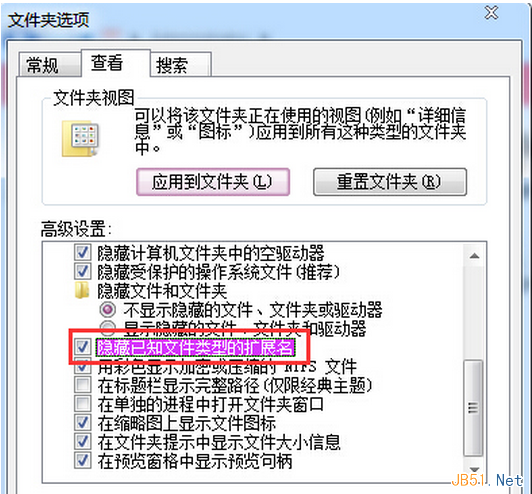
Windows 7 預設隱藏已知副檔名,導致用戶無法直接修改檔案格式。透過資料夾選項顯示副檔名即可自由更改。
設定完成後,所有檔案將顯示完整副檔名(如 document.txt、image.jpg),直接重新命名即可修改格式。操作前建議確認目標格式相容性,避免檔案損壞。
document.txt
image.jpg
Win7 資源回收筒無法開啟?顯示隱藏系統檔案進入 $Recycle.Bin 即可存取
Win10 RTM 候選版 Build 10176 鏡像洩露:64 位簡體中文企業版下載
Win10 Java 環境變數設定完整圖文教學
Win7 安裝軟體跳出 Nsis Error?建立捷徑加參數 `/NCRC` 繞過 CRC 檢查
Win10 「上帝模式」啟用教學:一個資料夾掌握所有控制台設定
Win7 蓝屏 Win32k.sys 错误排查:安全模式验证 → 干净启动定位第三方冲突 → 回溯近期变更 → sfc/scannow 修复系统文件
控制台將成歷史?Windows 10.1 或將完全移除控制台,統一由「設定」取代
Win7 登錄檔開啟立體聲混音:注冊表新增二進位值啟用內錄功能