Windows XP Windows 7 Windows 2003 Windows Vista Windows 綜合教學 Linux 系統教學
Windows 10 Windows 8 Windows 2008 Windows NT Windows Server 電腦軟體教學
您现在的位置: Windows教程網 >> Windows教程 >  >> Windows 綜合教學 >> 關於 Windows

Windows 10 無法存取路由器掛載硬碟?修改登錄啟用不安全來賓存取解決

編輯:關於 Windows

升級 Windows 10 後,部分用戶發現無法透過網路芳鄰存取路由器 USB 介面掛載的外接硬碟,提示連線失敗。這是因為 Windows 10 預設停用了「不安全來賓存取」機制。透過修改登錄即可解決。

解決方案

  1. 按 Win+R 輸入 regedit 開啟登錄編輯器。
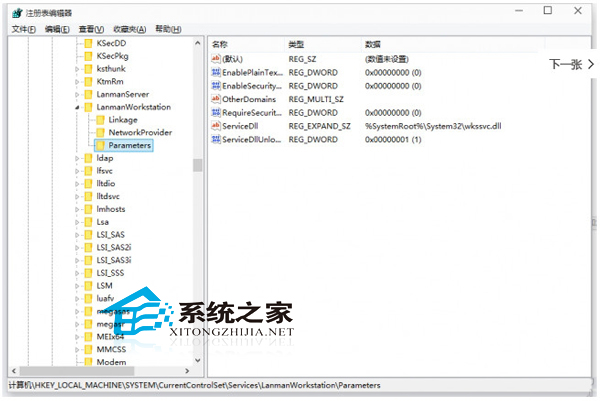
  2. 瀏覽至路徑:HKEY_LOCAL_MACHINE\SYSTEM\CurrentControlSet\Services\LanmanWorkstation\Parameters。
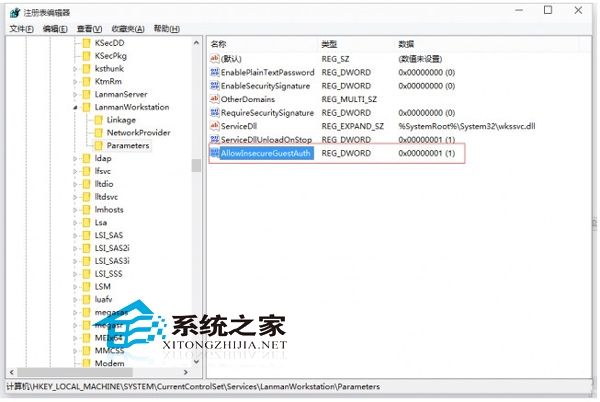
  3. 右鍵空白處 → 「新增」→ 「DWORD (32 位元) 值」,命名為 AllowInsecureGuestAuth。
  4. 雙擊該值,將數值資料設為 1,確定。
  5. 重新啟動電腦或重新啟動 Workstation 服務生效。

原理說明: 此設定允許 SMB 客戶端以來賓身分進行不安全驗證連線,相容於不支援加密驗證的舊式 NAS/路由器儲存裝置。操作前建議備份登錄,若擔心安全性,用畢後可將值改回 0 或刪除該鍵值。

Copyright © Windows教程網 All Rights Reserved