Windows XP Windows 7 Windows 2003 Windows Vista Windows 綜合教學 Linux 系統教學
Windows 10 Windows 8 Windows 2008 Windows NT Windows Server 電腦軟體教學
您现在的位置: Windows教程網 >> Windows教程 >  >> Windows 綜合教學 >> 關於 Windows

Windows XP 手動移除 IE 瀏覽器完整教學

編輯:關於 Windows

Internet Explorer 是 Windows 系統預設的瀏覽器,但部分 XP 使用者偏好其他瀏覽器,想徹底移除 IE。由於「新增/移除程式」中找不到 IE 的解除安裝選項,必須透過「開啟或關閉 Windows 功能」來操作。以下是詳細步驟:
移除步驟

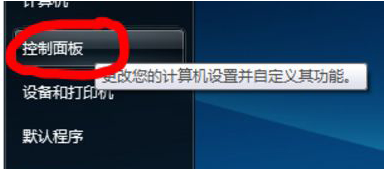
  1. 點擊「開始」→「控制台」。
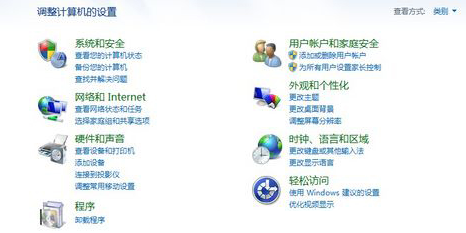
  2. 選擇「程式集」→「移除程式」。
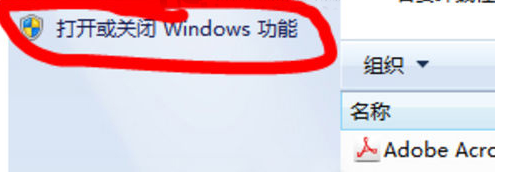
  3. 左側點擊「開啟或關閉 Windows 功能」。
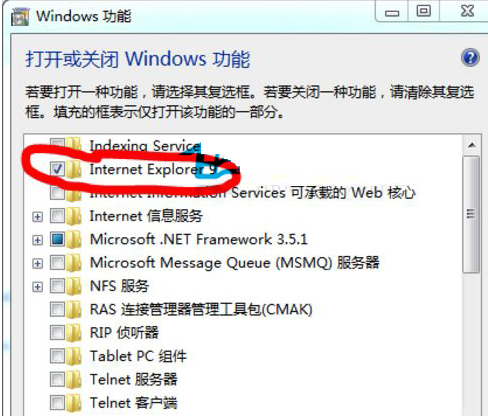
  4. 在元件清單中找到 Internet Explorer 9(或對應版本),取消勾選前方的核取方塊。
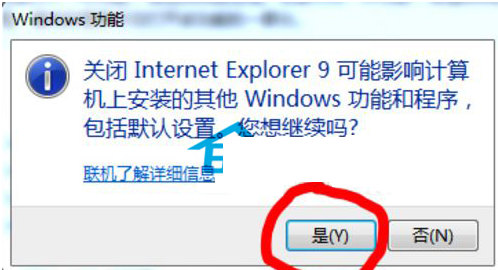
  5. 系統會彈出確認視窗,點擊「是」確認移除。
  6. 等待系統自動完成移除程序,過程中 IE 會被關閉。


恢復方法

若日後需要用回 IE,重複上述步驟,在「開啟或關閉 Windows 功能」中將「Internet Explorer 9」前的核取方塊勾選回去即可。

提醒:移除 IE 可能影響依賴 Trident 排版引擎的應用程式(如舊版 Outlook、某些企業內部系統),建議先確認相容性再操作。

Copyright © Windows教程網 All Rights Reserved