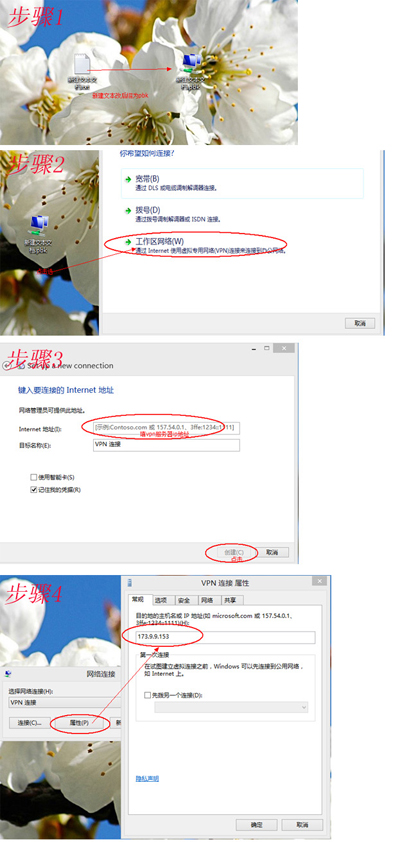
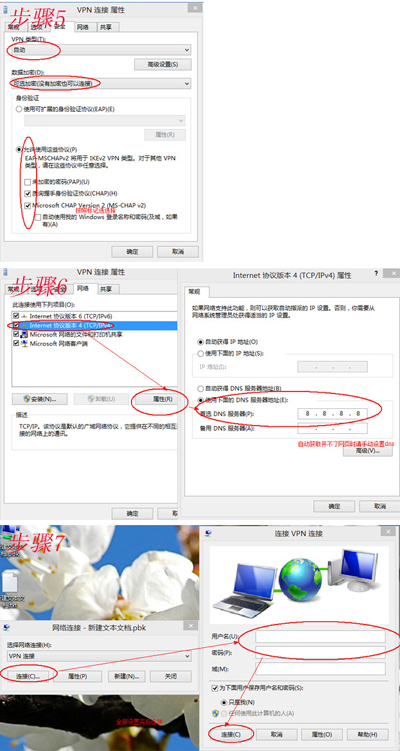
Windows 8 建立 VPN 連線流程與 XP 類似,同樣推廣「小語網路加速器」客戶端 (v8.0.2.2,3.11GB,2013-05-14 更新)。
參考 Windows 8 內建 VPN 精靈:網路和共用中心 → 設定新連線 → 連線到工作場所 → 使用網際網路連線 (VPN) → 輸入伺服器/帳號 → 完成。
核心參數仍需向 VPN 服務商取得。文中軟體下載連結已失效,建議使用正規企業級 VPN 服務。
Win10 如何開啟 IE 暫存資料夾?三種方法快速找到下載檔案教學
善用 Win8 內建 SkyDrive 線上轉換 PDF 為 Word 文件
Windows 8.1 系統重裝完整教程:善用內建恢復功能輕鬆還原
Win10 設定圖片密碼登入:比傳統密碼更安全更個性化
Windows 7 修改登入畫面預設輸入法:複製目前使用者設定至歡迎畫面與新帳戶
Windows 10 Mobile 10512 預覽版更新指南:所需空間、耗時與已知 Bug 總表
Win10 10547 即將支援超大尺寸動態磚?Office 宣傳圖洩密
Win7 透過稽核原則監控 QQ 程式操作 記錄存取行為