Build 10130 部分用戶回報無聲音,官方已知問題未列此項。解決方案:
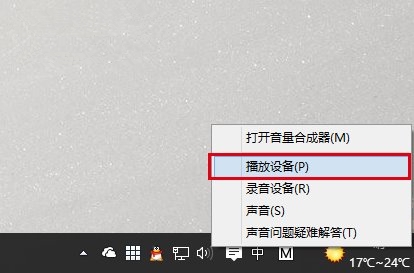
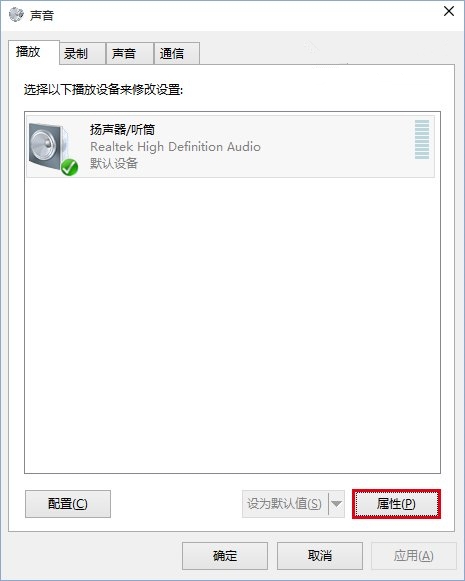
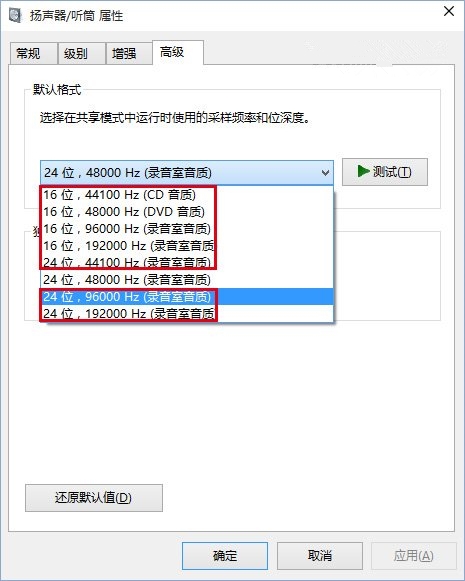
即可恢復聲音輸出。
Win10 Mobile 如何還原至 Windows Phone 8.1?Windows Phone Recovery Tool 完整操作教學
Win10 安裝中文語音包完整教學:將英文版系統漢化、啟用 Cortana 中文
微軟即將啟動 Windows 10 十月補丁內測 內部成員搶先體驗
史上最全 Win10/Win7/Win8.1 全部 ISO 系統鏡像下載
Windows 7 任務列縮圖預覽消失?群組原則一鍵恢復 Aero Peek
Win7 便箋誤刪後不再提示確認?修改登錄檔恢復刪除提示對話框
Win10 Build 10576 升級後已知問題完整彙總:音量降低、訊息應用遺失聯絡人、Surface Pro 3 睡眠異常等