Windows XP Windows 7 Windows 2003 Windows Vista Windows 綜合教學 Linux 系統教學
Windows 10 Windows 8 Windows 2008 Windows NT Windows Server 電腦軟體教學
您现在的位置: Windows教程網 >> Windows教程 >  >> Windows 綜合教學 >> 關於 Windows

Win10 禁止「你已安裝可開啟此類檔案的新應用程式」彈窗提示:登錄檔一鍵關閉

編輯:關於 Windows

Win10 每次開啟新關聯應用程式都會彈出提示框「你已安裝可開啟此類檔案的新應用程式」,資訊價值低且干擾體驗。透過登錄檔可徹底關閉。

關閉步驟

  1. Win+R 輸入 regedit 開啟登錄編輯器。
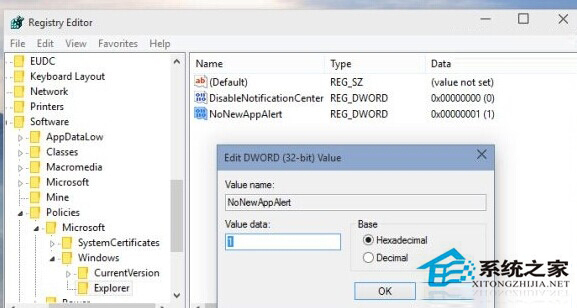
  2. 定位至:HKEY_LOCAL_MACHINE\SOFTWARE\Policies\Microsoft\Windows\Explorer(若無 Explorer 金鑰請自行新增)。
  3. 右側新建 DWORD (32 位元) 值,命名 NoNewAppAlert。
  4. 數值資料設為 1。
  5. Win+R 輸入 cmd,執行 GPUpdate.exe /force 強制套用群組原則,或登出重新登入。
恢復提示

將 NoNewAppAlert 數值改為 0 或刪除該值,再執行 GPUpdate /force 即可恢復。

修改登錄檔前建議先匯出備份,操作無風險且不影響系統穩定。

Copyright © Windows教程網 All Rights Reserved