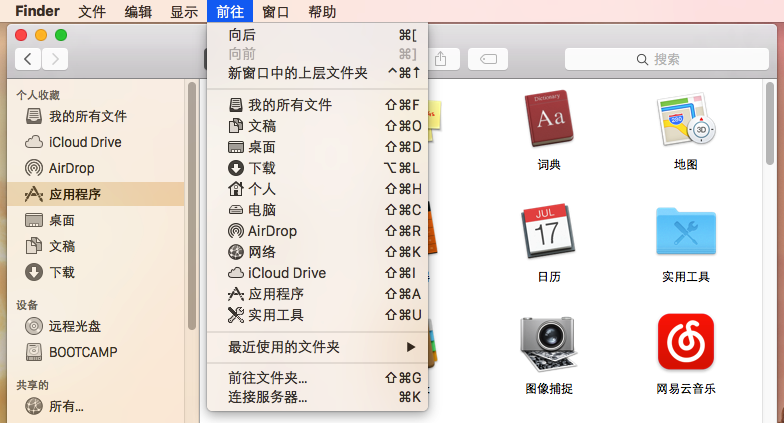
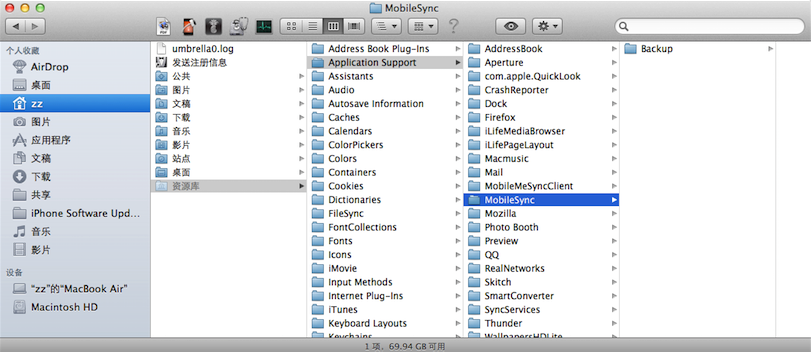
Mac 上 iTunes 備份路徑查找兩法:
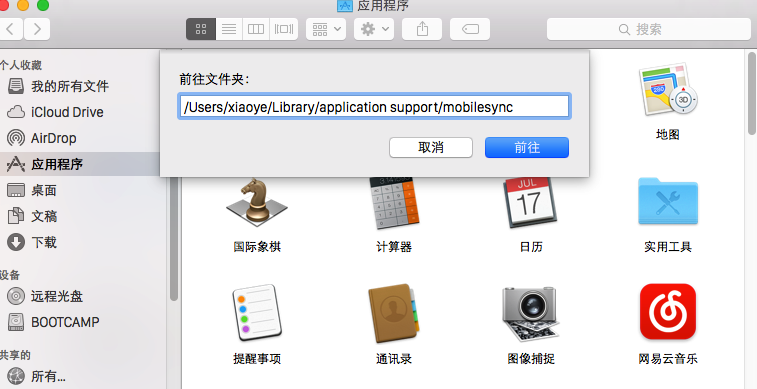
Application Support → MobileSync → Backup 即為備份資料夾。~/Library/Application Support/MobileSync → 回車 → 進入 Backup。方法二更快捷,方便直接管理備份檔案。
Windows 8 解決 80 連接埠被 SYSTEM 進程佔用
Win10 Mobile 累積更新 14393.351 上手體驗影片:穩定性提升、藍牙連線問題為主要遺憾
安裝 KB3035583 出現 GWX.exe 無法開啟?官方修復工具一鍵解決
Win7/Win8.1 升級 Win10 出現黑畫面/藍畫面?三大解決方案:安全模式停用獨顯、重命名網銀驅動、BIOS 關閉 Secure Boot
Windows 10 離線狀態無法使用 PIN 碼登入?先用密碼登入再鎖定螢幕啟用離線 PIN 權限
Win8.1 新建帳號無法開啟內建應用?修復 AppRepository 與 WinStore 目錄