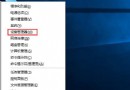
Win10 升級後無法開機,顯示錯誤代碼 0xc0000428,通常因驅動程式簽名驗證失敗。修復方法:進入高級啟動選項禁用驅動程式強制簽名。
此法繞過驅動簽名檢查,適用於升級後驅動不相容導致的開機失敗。

Win8.1 32位元 vs 62位元差異詳細解析:該裝哪個?
Windows 10 Mobile 系統截圖曝光:Build 10149 Edge 瀏覽器加入、地址列歸位底部
Win10 命令提示字元全面進化:支援 Ctrl+C/V/A/F 快捷鍵、視窗最大化、文字自動換行、透明度調整
Win7 無法存取區域網路提示 0x80070035「找不到網路路徑」?新增 Microsoft 網路用戶端即可解決
Win7 開啟剪貼板檢視內容 使用指令 clip /? 快速查看
Win7 記憶體錯誤「該記憶體不能為 Read」完整解決指南:註冊 DLL、修補丁、換記憶體槽、清理右鍵選單、註冊表 ShellExecuteHooks