許多軟體需 .NET Framework 執行環境。若執行時提示需安裝,表示系統缺少對應版本。快速檢查方法:
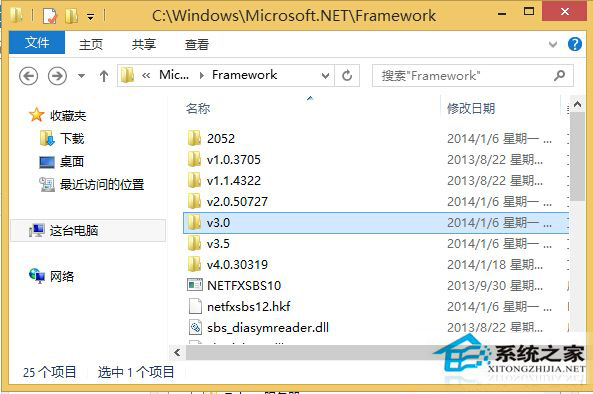
這台電腦 → C: → Windows → Microsoft.NET → Framework
v3.5
此法適用所有 3.0 以上版本 .NET Framework 查詢。
Windows 10 免費升級:盜版 Win7/Win8 能否免費升級成正版 Win10?
Win10禁止TeamViewer開機自啟動的簡單設置教程
Win7 用戶注意:12 月更新含數位憑證信任清單補丁 (Xbox Live 私鑰洩露),需確認 KB2677070 已安裝才能自動更新
USB 隨身碟安裝系統完整圖文教學:新手也能輕鬆上手
Win7 IE 瀏覽器每次開啟都要重新登入?Internet 選項設定錯誤導致 Cookie 遺失完整修復
Win7 工作管理員進程清單上下跳動無法選取?按 Ctrl 鍵即可暫停
Win10 筆電設定自動連線 Wi-Fi,開機即網無需手動點選
WinXP/Win7 無法開啟「我的電腦」/「我的文件」?Explorer 殼修復批次檔一鍵修復