Windows XP Windows 7 Windows 2003 Windows Vista Windows 綜合教學 Linux 系統教學
Windows 10 Windows 8 Windows 2008 Windows NT Windows Server 電腦軟體教學
您现在的位置: Windows教程網 >> Windows教程 >  >> Windows 綜合教學 >> 關於 Windows

Windows 10 開始選單太複雜?用戶反饋難找應用,微軟提供多種替代方案

編輯:關於 Windows

Win10 還有 20 多天正式登場,微軟帶回熟悉的開始選單,融合 Win7 風格與 Win8 磚塊。微軟認為改進多且更易存取應用,但部分用戶覺得過於複雜,在 Windows UserVoice 反饋「開始選單過於複雜,滾動檢索困難,應簡化」,兩週獲上千回應。
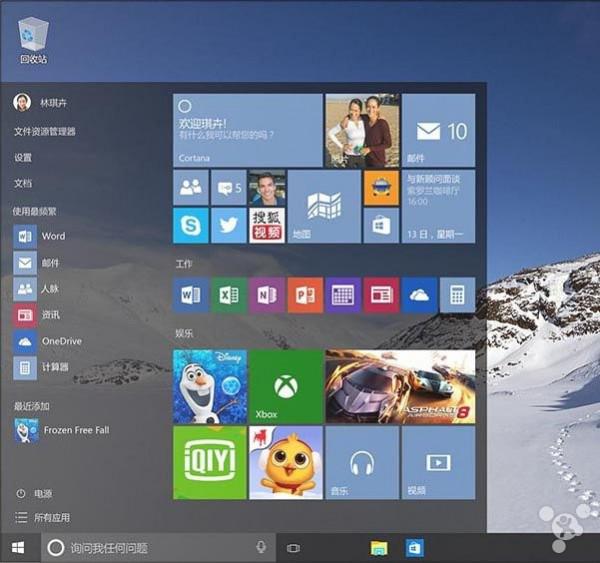
實際上善用功能可解決:

  1. 使用搜尋:開啟開始選單直接輸入應用名稱。
  2. 將常用應用以磚塊釘選右側快速存取。
  3. 給磚塊分組,依習慣/功能分類。
  4. 傳統桌面捷徑仍是選項。

討好每個用戶不可能,微軟常面臨滿足一建議又冒出矛盾新建議。

另一種開始選單概念? 有測試用戶建議移除動畫/動態磚塊,保留「收藏夾」、「最近使用」、「跳躍清單」,支援視覺調整(大小、毛玻璃、晝夜模式),並能直接從開始選單存取更多 PC 設定(無需開設定視窗)。
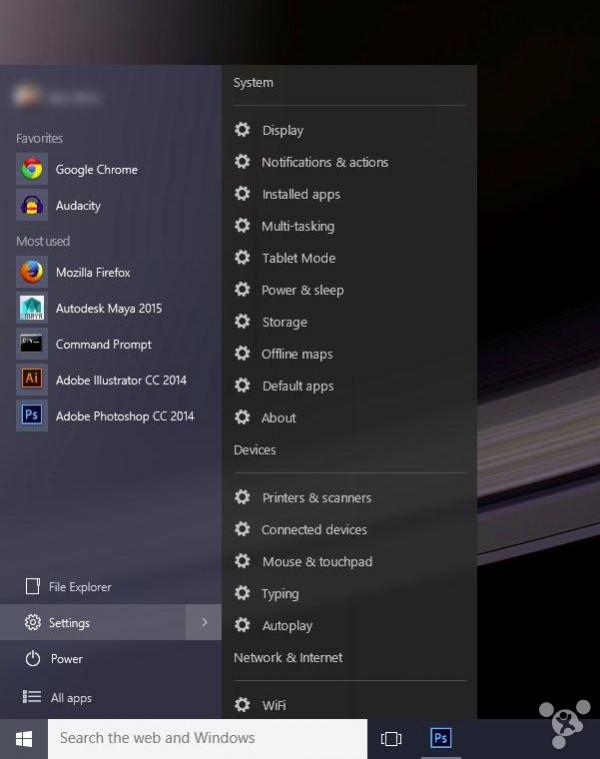
此概念更人性化(快速存取設定),但對想快速找應用的用戶或許不討喜。


Copyright © Windows教程網 All Rights Reserved