IIS (Internet Information Services) 為 Windows 內建網站伺服器工具,可架設 Web、FTP 等服務。Windows 8.1 專業版啟用步驟:

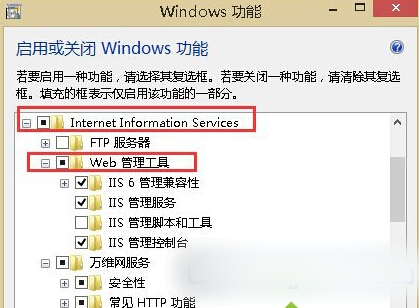
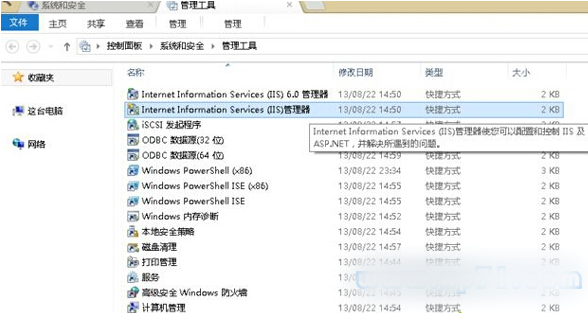
完成上述步驟即可在 Windows 8.1 使用 IIS 架設伺服器服務。
Win7/Win8.1 升级 Win10 报错 0x80070002?缺少 boot.wim 文件的修复方案
Win7 安裝軟體跳出 Nsis Error?建立捷徑加參數 `/NCRC` 繞過 CRC 檢查
Win10 確認雙瀏覽器共存:IE 11 保留相容、Spartan 獨享新 Edge 引擎
盜版 Windows 也能免費升級 Windows 10?微軟確認:升級後仍屬非正版,可能每小時黑屏提醒
Win7 桌面圖示無法拖曳?三步驟快速解決「自動排列」鎖定問題
Win7/Win8 IE 瀏覽器無法下載檔案?7 大排查方案:從網路連線到下載管理器逐一擊破