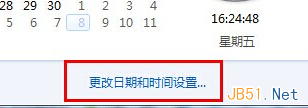
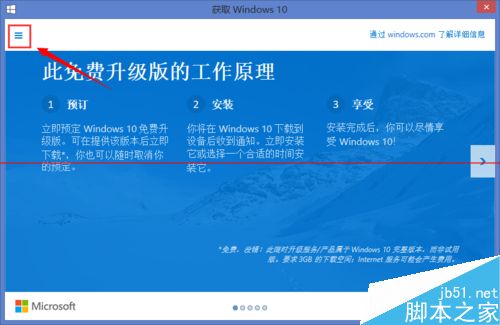
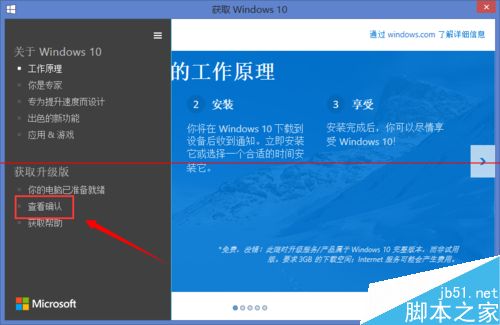
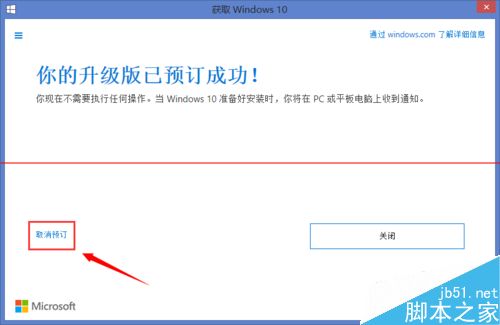
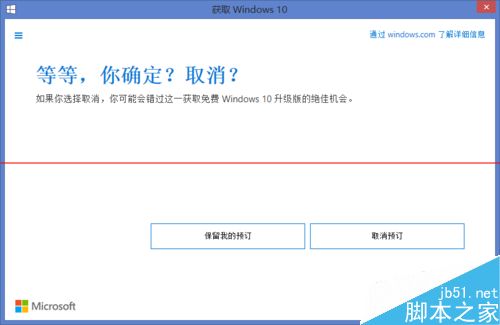
預約升級服務可能影響電腦速度,因其會定期檢測升級狀態且佔用資源。關閉預約可改善情況。以下為取消步驟:
Win10 升級報錯 0x80070070 / 1049?擴充系統分區解決空間不足
Win10 Build 9926 首波修補程式釋出:修正 18 項問題含開始選單、商店、虛擬機、藍牙
Win7 查看局域網 ARP 網路狀態指令教程:ipconfig/arp -a/arp -d 核心指令詳解
Windows 7 開機黑屏提示「Non-system disk or disk error」?主分區未啟用導致,PE 修復啟用即可解決
Win10 TH2 正式版 10586 官方 ESD 映像轉 ISO 完整教程:新版解密工具支援雙版本合一映像
Win8 藍畫面錯誤代碼 0x00000019 完整排除指南:BAD_POOL_HEADER 核心記憶體池損毀
Win10 免費升級僅限首年!Gabriel Aul 確認:首年免費、之後需付費、授權為買斷制
Win7/8.1/10 安裝 KB3114717 導致 Office 2013 Word/Outlook 無法啟動?微軟已撤回補丁,速卸載恢復