Win8 IE 預設 HTML 編輯器可能為前端開發工具(如 Visual Studio、Expression Web),若習慣用記事本快速編輯原始碼,可依下列步驟變更:
設定步驟
- 開啟 IE 瀏覽器 > 右上角齒輪圖示 > 「網際網路選項」。
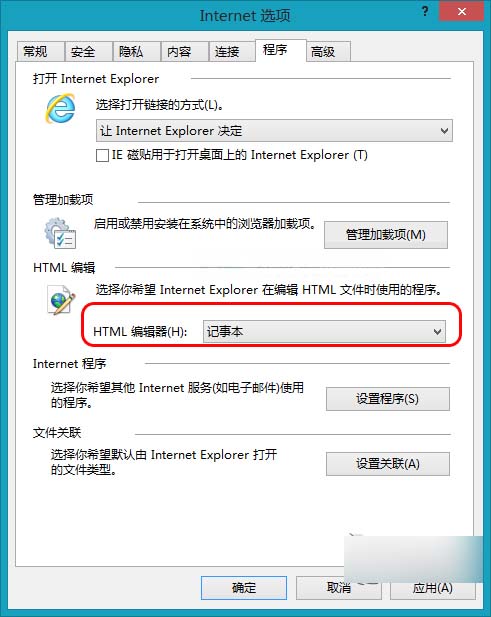
- 切換到「程式」索引標籤。
- 在「HTML 編輯器」下拉選單中選擇「記事本」,點選「確定」儲存。
補充說明
- 此設定影響 IE「檢視原始碼」與「編輯」功能呼叫的外部編輯器。
- 若下拉選單無「記事本」,可點選「瀏覽」手動指向
C:\Windows\notepad.exe。
- 同樣適用於 Win7/Win10 IE 模式。
設定完成後,IE 中右鍵網頁選擇「檢視原始碼」或「編輯」即會以記事本開啟,輕量快速。