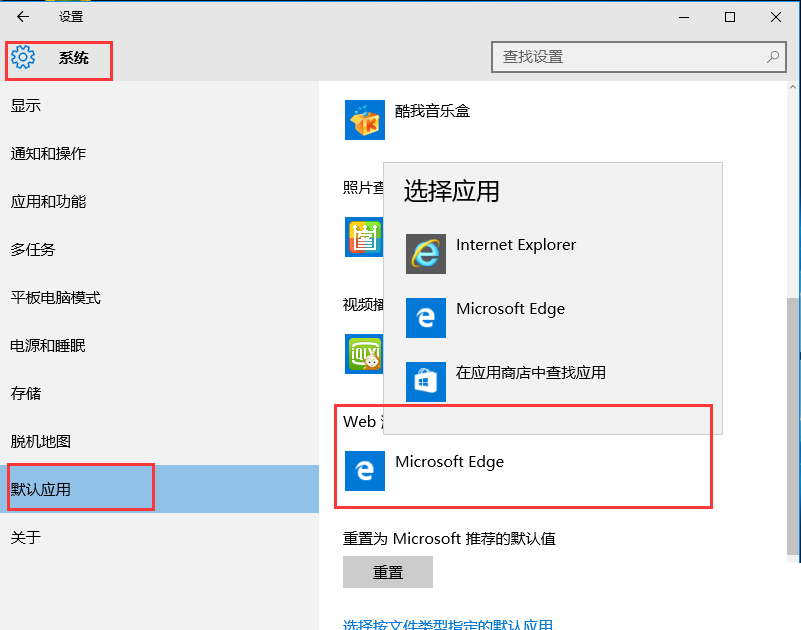
Win10 不再允許第三方瀏覽器直接修改預設值,必須由使用者在系統設定中手動變更:
注意:Firefox 除外,其他瀏覽器若嘗試自行設定預設會彈出提示,但不會自動跳轉至設定頁,必須手動操作。
Win10 打開 .doc 文件亂碼?安裝 WPS 或 Office 完美兼容舊格式
微軟邀請參加 7 月 29 日 Windows 10 發布會:北京水立方晚間慶祝活動報名中
Windows 7 透過群組原則停用控制台防止他人更改設定
Win 10 如何刪除 windows.old?磁碟清理功能一鍵移除
Win7 連接 XP 共用印表機報錯 0x0000004?安裝驅動程式透過 Windows Update 解決
Win7 開啟螢幕鍵盤(軟體鍵盤)教學:控制台輕鬆存取中心啟用
Win10 滑鼠右鍵無「解壓縮」選項?安裝解壓縮軟體即可恢復
WinXP 無法開啟 CHM 檔案?「解除鎖定」一鍵修復