問題成因:使用者帳戶控制 (UAC) 的 EnableLUA 值導致 AutoCAD 通訊失敗。解決方法:
regedit,定位 HKEY_LOCAL_MACHINE\SOFTWARE\Microsoft\Windows\CurrentVersion\Policies\System。EnableLUA,數值資料改為 0。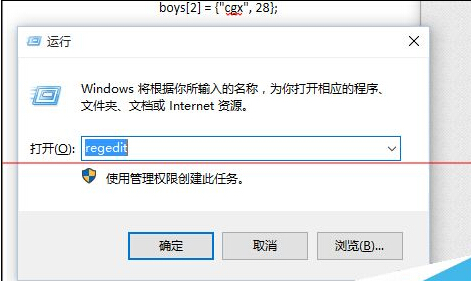
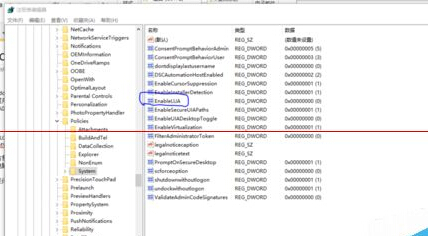
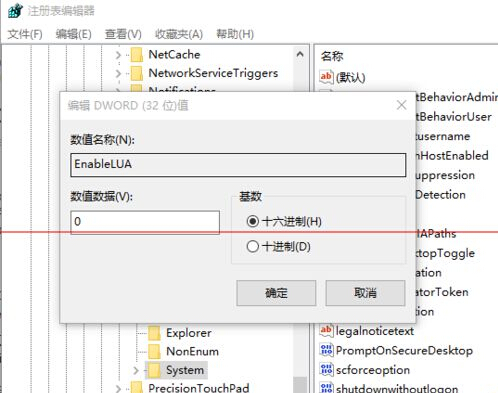
副作用: 停用 EnableLUA 後,系統內建 Modern 應用(Edge、Xbox 等)將無法啟動。控制台「使用者帳戶控制設定」滑桿調整在 Win10 上無效,必須改登錄檔。
Win10 Build 10041 技術預覽版官方 ISO 下載連結(含安裝金鑰)
Win7 音量圖示消失/灰色?五大原因與對應解決方案 (驅動、系統圖示、音訊服務、Explorer、硬體)
WinXP 無法刪除影片檔案解法:取消註冊 shmedia.dll 移除預覽
Win8.1 更新後黑畫面/藍畫面?顯卡驅動不相容為主因,安全模式卸載重裝最新版即可修復
修改 Windows 8 右鍵預設圖片編輯器:透過登錄替換為 Photoshop 等專業軟體
科普:Windows ProgramData 資料夾是做什麼的?應用程式資料集中存放地