微軟分批推送 Win10 升級,若長時間未收到通知,請依序排查:
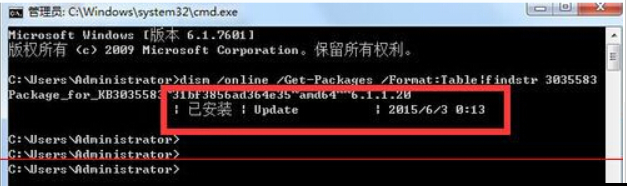
管理員權限 CMD 執行:
dism /online /Get-Packages /Format:Table | findstr 3035583若無輸出,請至 Windows Update 檢查安裝。
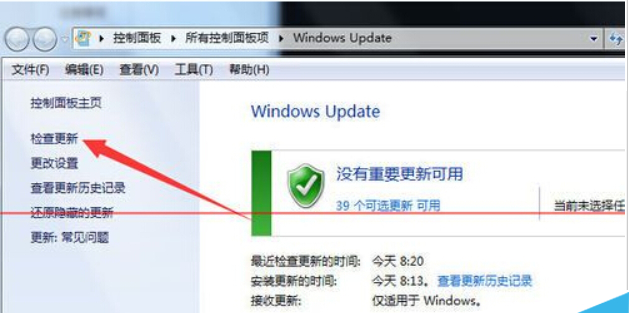
管理員 CMD 執行:
%windir%\system32\GWX\GWXConfigManager.exe /RefreshConfig & ping 127.0.0.1 > nul & %windir%\system32\GWX\GWX.exe成功後右下角會出現 Windows 圖示,點擊即可升級。
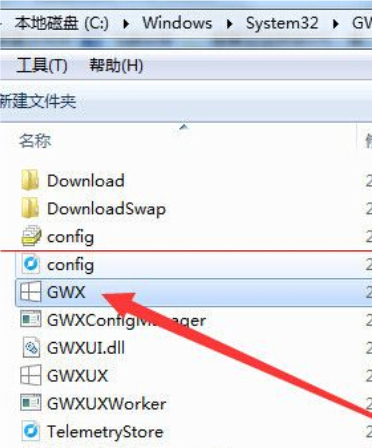
注意:推送分批進行,若非本批名單需耐心等待;C:\$Windows.~BT 資料夾大小可判斷下載進度。
Win8 玩 LOL 出現 Client.exe 應用程式錯誤 0xc0000045?卸載 2345 安全衛士即可解決
Windows 任務排程器實現電腦閒置自動關機:無需第三方軟體
Windows 10 內建計算機完整功能介紹 科學/程式設計/12種單位轉換
Win7 啟動修復提示無法驗證 amdxata.sys 數位簽章?禁用驅動簽章強制+替換檔案解決
Win7 取消自動睡眠鎖屏:在電源選項→更改計劃設定→「讓電腦進入睡眠狀態」選擇「永不」
Win10 正式版桌面變黑色背景僅剩回收站?兩階段恢復圖示與壁紙教學
Win7 蓝屏 Win32k.sys 错误排查:安全模式验证 → 干净启动定位第三方冲突 → 回溯近期变更 → sfc/scannow 修复系统文件