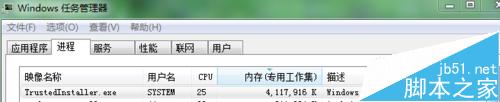
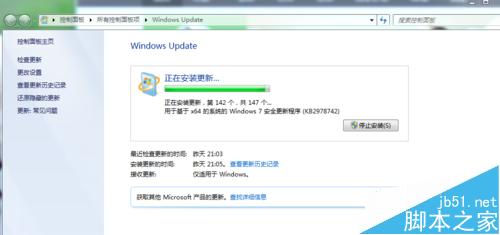
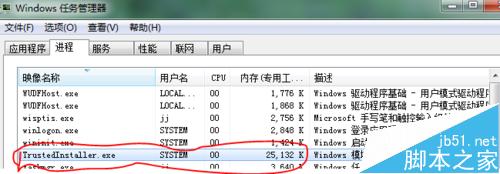
TrustedInstaller.exe(Windows 模組安裝程式)記憶體佔用飆高,通常因 Windows Update 正在背景下載/安裝更新。強制結束進程會中斷更新,導致系統檔案損壞風險。正確做法是調整更新策略,讓其在電腦閒置時運行。
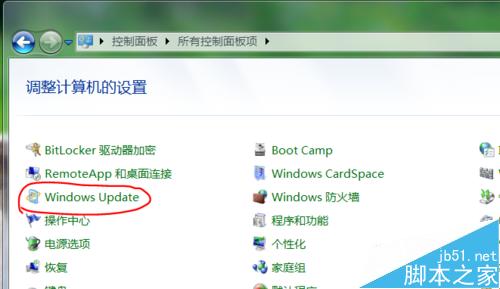
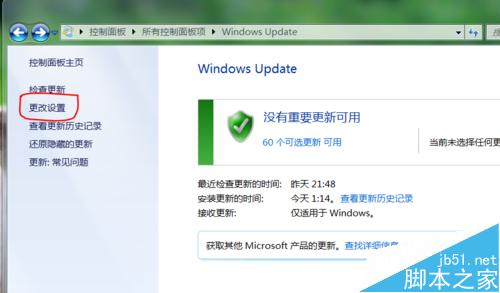
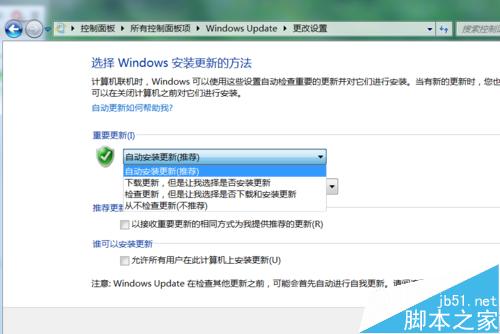
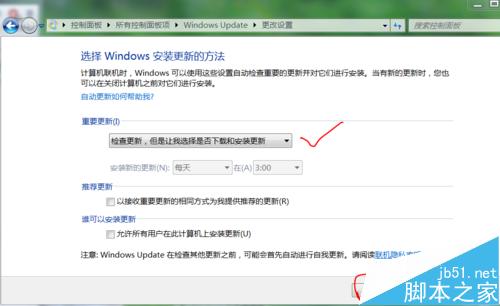
⚠ 切勿選擇「從不檢查更新」,定期更新對系統安全性與穩定性至關重要。選擇手動控制下載安裝時機,即可在不影響工作時段的前提下保持系統最新,與 TrustedInstaller.exe 「和平共處」。
Win7 刪除檔案提示「需要 TrustedInstaller 權限」?取得檔案擁有權與完整控制權限即可解決
[圖輯] Win10 Build 10041 系統體驗:透明開始選單、任務檢視、小娜、UI 圓潤化 20 張高清截圖賞析
如何下載 Win10 正式版官方 ISO?微軟英文官網 MediaCreationTool 完整圖文教學
Win7/Win8.1 免費升級 Win10 一年後還要每年付費嗎?微軟官方回應:不會訂閱制
修復 Win8.1 Metro 應用無法開啟:DISM 掃描修復映像、sfc/scannow 修復系統檔案
Win10 Mobile Build 10586.xx 持續更新:WP8.1 用戶可直升最新版
【圖輯】Windows 10 Insider Preview Build 10074 介面搶先看:Cortana 整合開始選單、毛玻璃回歸、系統音效更新