Windows XP Windows 7 Windows 2003 Windows Vista Windows 綜合教學 Linux 系統教學
Windows 10 Windows 8 Windows 2008 Windows NT Windows Server 電腦軟體教學
您现在的位置: Windows教程網 >> Windows教程 >  >> Windows 綜合教學 >> 關於 Windows

Win10 升級提示 peckp.sys 不兼容?三步徹底解決

編輯:關於 Windows

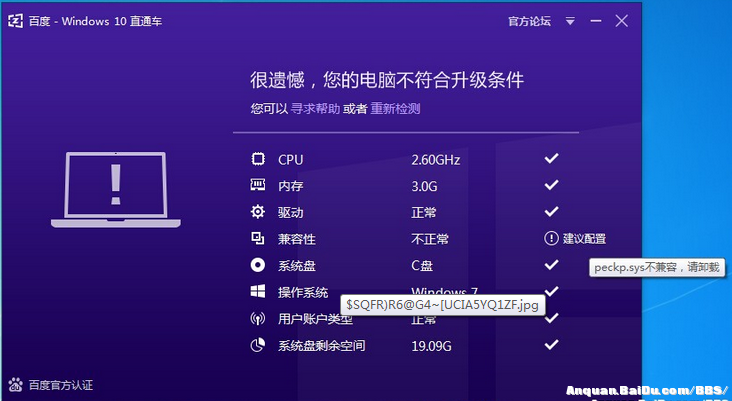
使用百度 Win10 直通車升級 Windows 10 時,部分用戶遇到 peckp.sys 驅動不兼容的檢測提示,導致無法繼續升級。該驅動屬於早期網銀組件,現已停用,刪除即可解決。以下是實測有效的完整操作流程。
解決步驟

1. 移除舊版網銀程式

開啟「控制台」→「程式和功能」,找到並解除安裝相關網銀軟體,完成後重新啟動電腦。

2. 刪除殘留驅動檔案

若重啟後仍被檢測到,請前往系統盤(通常為 C 槽)路徑:
C:\Windows\System32\drivers
搜尋並刪除 peckp.sys 檔案。

3. 清理登錄檔殘留項

驅動檔案刪除後,登錄檔可能仍保留相關鍵值,需手動清理:

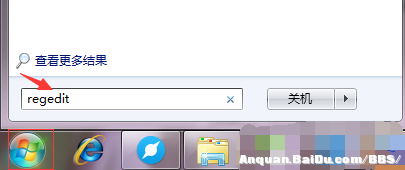
  1. 按 Win+R 輸入 regedit 開啟登錄檔編輯器。
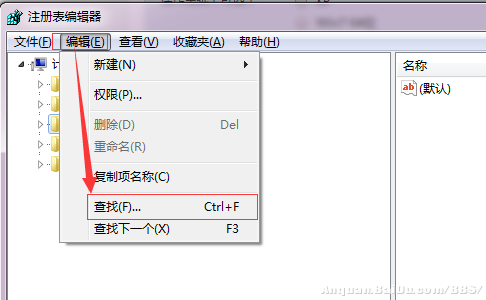
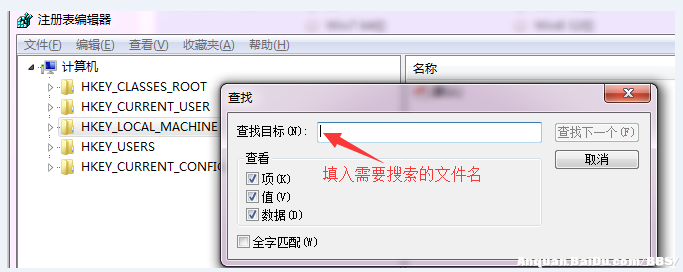
  2. 按 Ctrl+F 搜尋 peckp.sys。
  3. 找到對應的登錄檔鍵值,右鍵選擇「刪除」。

完成上述三步後,再次執行 Win10 直通車檢測,peckp.sys 不兼容提示即可消失,順利升級 Windows 10。

Copyright © Windows教程網 All Rights Reserved