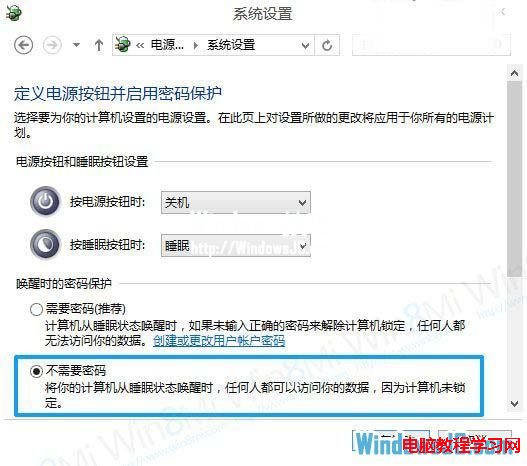
Win8 睡眠/休眠喚醒預設需輸入密碼,雖安全但單機用戶覺得麻煩。透過電源選項即可關閉喚醒密碼保護。
攜帶型裝置或共用電腦建議保留密碼保護,以防資料外洩。
Win10 Mobile 應用程式商店更新:查找更新更易達、單手操作優化
Windows 7 一鍵批次重新命名多個檔案:F2 鍵技巧與編號規則
Win10 Build 10122 正式推送:無 ISO、純修復版
Win7 如何停用多餘網卡?裝置管理員停用實體/虛擬網卡,含隱藏裝置顯示技巧
Windows 10 版本更新頻率加快,離正式版不遠了
Win8.1 更新补丁后无法切换窗口?卸载 KB3033889 补丁恢复正常
Win10 Redstone 14279 快速版修復內容匯總:Edge/小娜漫遊崩潰、剪貼簿刷新、升級藍屏等
Win8/8.1 系統 MT4 無法載入自訂指標?揭秘 AppData 虛擬化導致路徑錯位的解決之道