Windows XP Windows 7 Windows 2003 Windows Vista Windows 綜合教學 Linux 系統教學
Windows 10 Windows 8 Windows 2008 Windows NT Windows Server 電腦軟體教學
您现在的位置: Windows教程網 >> Windows教程 >  >> Windows 綜合教學 >> 關於 Windows

Win7 斷電重啟藍屏 protectsrv.sys?刪除異常驅動檔案即可修復

編輯:關於 Windows

故障現象

Win7 系統在斷電或異常關機後重啟,出現藍屏死機(BSOD),錯誤模組指向 protectsrv.sys 或類似 protectsrv2175952.sys 檔案。
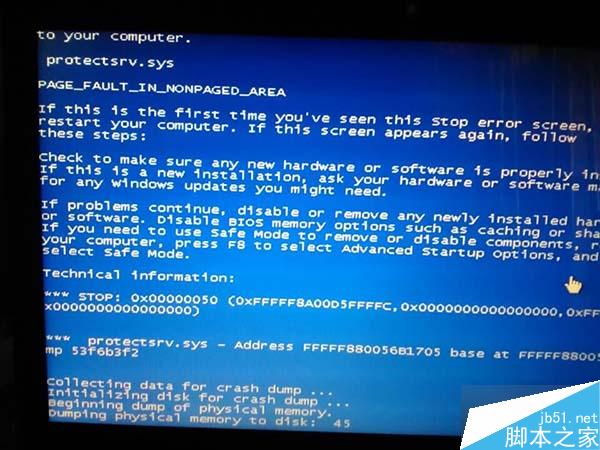
protectsrv.sys 藍屏畫面

原因分析

protectsrv.sys 通常屬於某些加密鎖、授權保護軟體(如軟體加密狗驅動)或虛擬光碟機工具的核心模式驅動程式。斷電導致檔案系統損毀,該驅動載入時觸發核心錯誤。

解決步驟

  1. 開機進入 Windows(若無法進入桌面,請先進入安全模式或使用 PE 系統)。
  2. 點選「開始」→「搜尋」,輸入 protectsrv 進行搜尋。
  3. 搜尋結果通常位於 C:\Windows\System32\Drivers\ 目錄下,確認檔案名稱為 protectsrv*.sys。
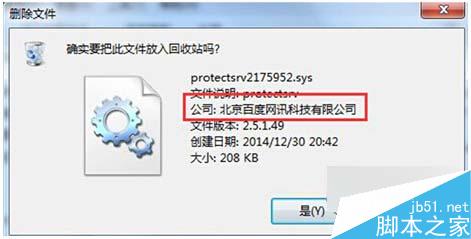
  4. 以滑鼠右鍵刪除該檔案(需系統管理員權限)。
  5. 清空回收筒,重新啟動電腦。

刪除 protectsrv.sys 檔案

後續建議

  • 若該驅動屬於正版軟體授權元件,刪除後該軟體可能無法執行,請重新安裝對應軟體以重建正常驅動。
  • 建議檢查硬碟健康狀態(SMART),斷電易造成邏輯壞軌或檔案系統錯誤,可執行 chkdsk /f /r 修復。
Copyright © Windows教程網 All Rights Reserved