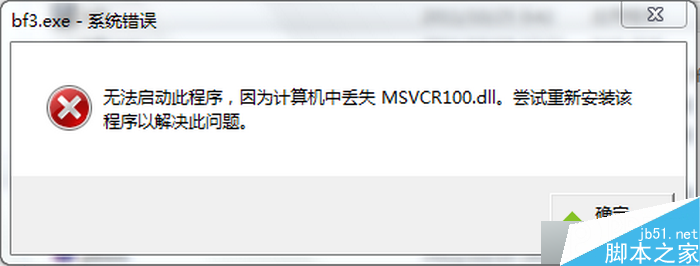
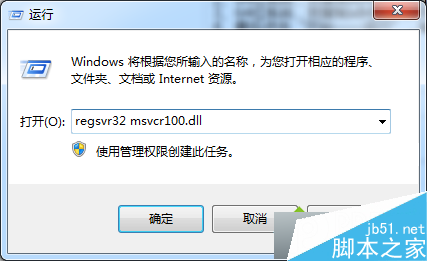
msvcr100.dll 為 Visual Studio 2010 執行元件,遺失導致程式無法啟動。解決:下載對應版本 dll → 32 位系統放 C:\Windows\System32、64 位系統放 C:\Windows\System32 並另放 C:\Windows\SysWOW64 (文中寫 system64 應為 SysWOW64) → Win+R 執行 regsvr32 msvcr100.dll 註冊 → 重開機。文章附錯誤訊息與檔案放置路徑截圖。
C:\Windows\System32
C:\Windows\SysWOW64
regsvr32 msvcr100.dll
Win10 提示遺失 xinput1_3.dll 怎麼辦?安裝 DirectX 執行階段庫解決
Windows 7 忘記密碼進階解決方案:利用 Sticky Keys (利用管理員功能) 替換法啟用內建 Administrator / 建立新管理員帳戶
2016 年 Win10 RS1 預覽版 11095 已送交合作夥伴,下一波推送可期
Win7 旗艦版運行程式提示缺少 libcurl.dll 怎麼解?下載註冊兩步修復
Win7 IE 管理增益集:停用/移除工具列、ActiveX、瀏覽器助手物件 (BHO)
Win10 滑鼠指標在哪設定?兩種路徑快速自訂指標外觀
Windows 7 啟用與授權命令大全:slmgr.vbs 參數完整速查表
Win7 玩《俠客風雲傳前傳》黑屏?更新顯卡驅動、裝遊戲運行庫、雙顯卡切獨顯三步排除