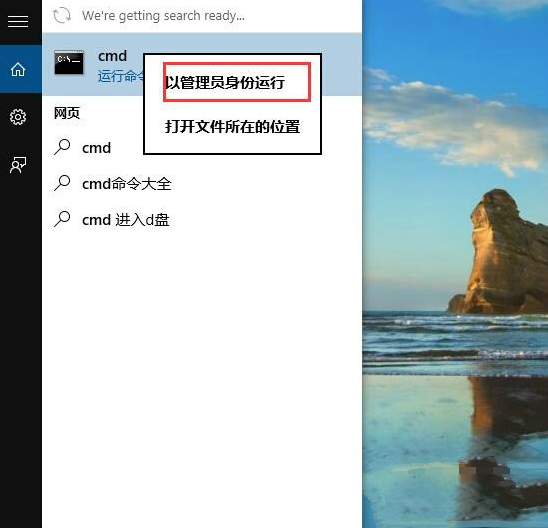
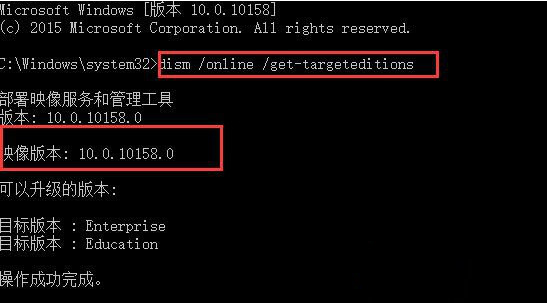
Windows 10 升級後若需確認目前系統映像版本(如 1511、1607、1703 等),無需翻閱設定介面,透過命令提示字元執行 DISM 指令即可即時顯示。
CMD
dism /online /get-targeteditions
winver
systeminfo | findstr /B /C:"OS Name" /C:"OS Version"
Win8 應用程式商店缺少自動更新選項?兩招快速修復教學
微軟推送 Win10 Mobile/PC 週年更新累積補丁 KB3189866 (14393.187)
Windows 7 啟動 WLAN AutoConfig 服務失敗 錯誤代碼 1068 修復方法
Windows 7 開機提示「可能需要其他登入資訊」?登錄表修復網路連線檢測
百度 Win10 直通車下載的安裝檔在哪?預設儲存於非系統盤、容量最大且大於 5GB 的磁碟分區
Win8 網路診斷提示「預設閘道不可用」三大修復方案
Win10 最新觸控板手勢功能詳解:三指操作桌面、工作檢視、切換視窗
Windows 查詢連接埠佔用進程指令教學:netstat 與 tasklist 實戰