Win10 設定 App 或工作列搜尋框輸入關鍵字無結果,主因索引資料庫損毀。透過重建 Indexed 資料夾索引屬性可修復。
%LocalAppData%\Packages\windows.immersivecontrolpanel_cw5n1h2txyewy\LocalState 開啟資料夾。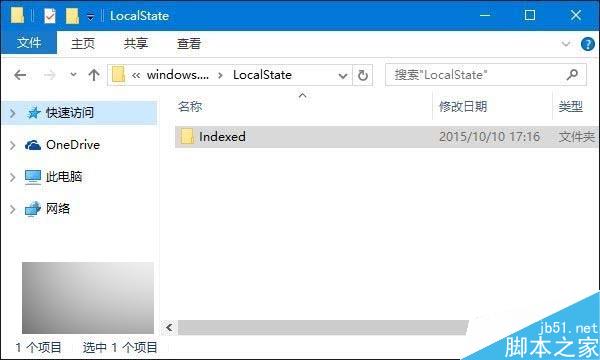
Indexed 資料夾 →「內容」→「進階」。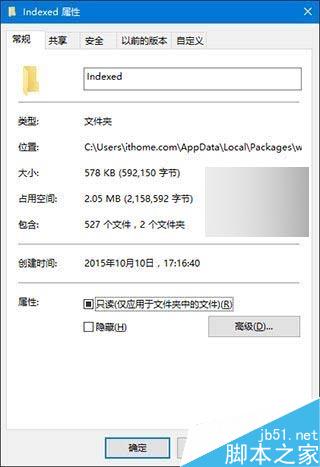
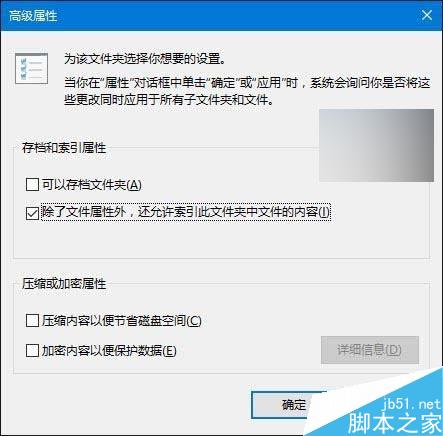
此法同樣適用於工作列 Cortana/搜尋框失效情況。
Win10 10547 版開始選單新功能:啟用「顯示更多磚」擴展至四欄佈局
Win7 休眠後自動重開機?關閉喚醒定時器與網卡喚醒功能解決
Windows 命令提示字元快速設定環境變數:Path、Classpath 一鍵搞定
Win8 解除 Metro 應用程式網路隔離:本機群組原則與 LoopbackExempt 指令完整教學
Win10 提示 werfault.exe 應用程式錯誤?停用 Windows 錯誤回報服務 + 清理暫存檔案徹底解決
Win8.1 Mouse without Borders 滑鼠失效「無法連線找不到主機」?官方修復工具自動修復
USB 隨身碟安裝 Win10 預覽版完整圖文教程(支援 UEFI/BIOS 雙模式)
Windows 7 筆電將驅動程式自動安裝改為手動模式:裝置安裝設定勾選「絕不從 Windows Update 安裝驅動程式」