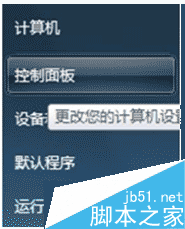
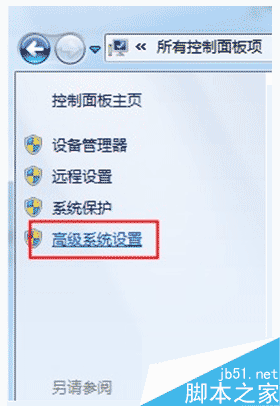
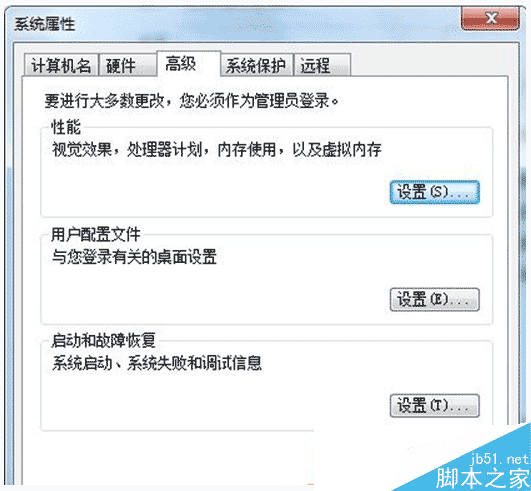
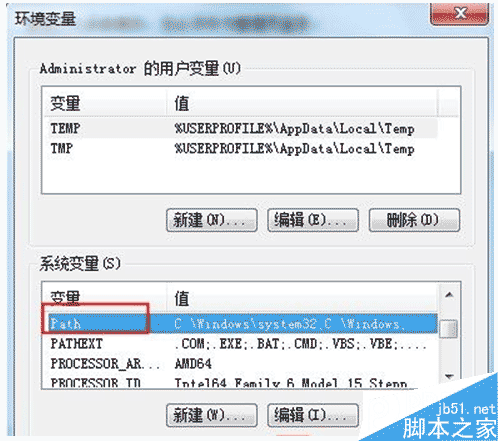
Win7 命令提示字元輸入指令無效怎麼辦?CMD 可高效操作電腦解決問題,但指令提示無效時,以下修復環境變數 Path 即可解決。
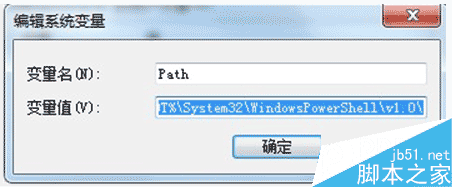
Path
%SystemRoot%\system32;%SystemRoot%;%SystemRoot%\System32\Wbem;%SYSTEMROOT%\System32\WindowsPowerShell\v1.0\
以上為 Win7 CMD 指令無效修復環境變數 Path 完整步驟,希望能幫助大家!
Windows 10 承諾卻遲未上線的六大功能深度盤點
Windows XP 系統建立 L2TP VPN 連線完整圖文教學
Windows 7 常見死機兩大類型與解決方案:開機自檢死機、定時死機
Win10 工作列跳躍清單顯示數量不夠?修改登錄 JumpListItems_Maximum 突破 12 項限制
Win10 TH2 累積更新 KB3116908 安裝教學與失敗排除
Win8 啟用 SmartScreen 篩選器,IE 瀏覽上網多一層防護
Win10 正式版 Edge 瀏覽器收藏夾在哪裡?本地路徑完整公開
重裝 Win7 開機報錯「Inconsistent filesystem」無法啟動?MBR 修復教學