錯誤代碼 0x80070643 主要由系統元件損毀導致,常見於 Windows Update 或軟體安裝更新過程中。
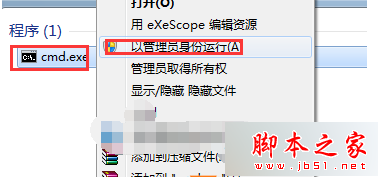
CMD
cmd.exe
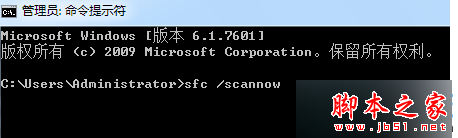
sfc /scannow
SFC 會自動比對並修復受損的系統檔案,解決多數 0x80070643 錯誤。若問題持續,可考慮使用 DISM 工具進一步修復元件存放區。
Win10 螢幕亮度自適應開啟/關閉教學:控制台電源選項與 Sensor Monitoring Service 双重控制
Windows 8 切換至 Administrator 超級管理員帳戶教學:電腦管理啟用內建帳戶
Windows 10 Build 10162 無法啟動?電話啟動法 (slui 4) 步驟詳解
XP 安裝軟體提示「系統找不到指定路徑」?原因是中文用戶名路徑
盜版 Windows 也能免費升級 Win10?騰訊/360 管道一鍵升級詳解
Win10 系統版本號怎麼看?兩種快速查看建置版本方法
Win10 Compact OS 壓縮模式啟用教學:一行指令釋放 2GB 系統空間
Win7 空資料夾無法刪除?八大解決方案徹底清除頑固目錄