Win7 開機彈出 nvstreamsvc.exe - 應用程式錯誤,為 NVIDIA 串流服務異常。提供兩種修復法:
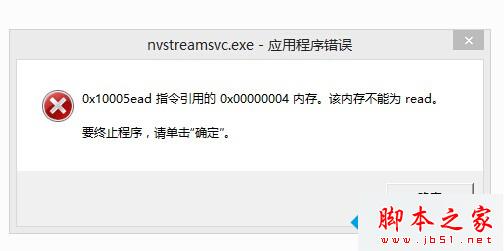
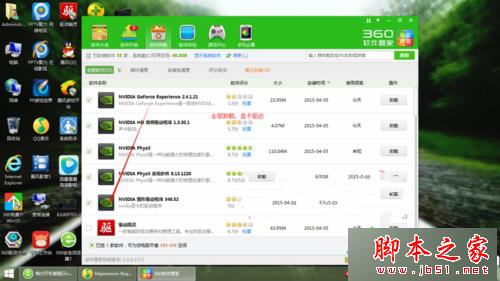


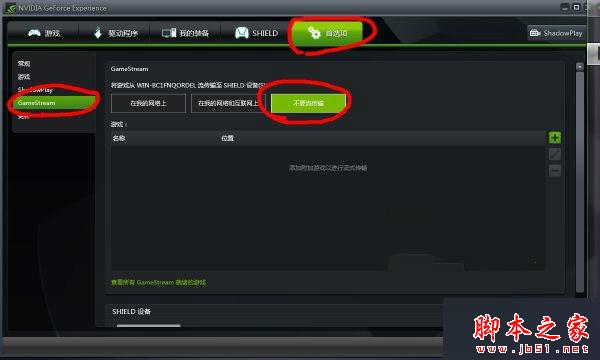
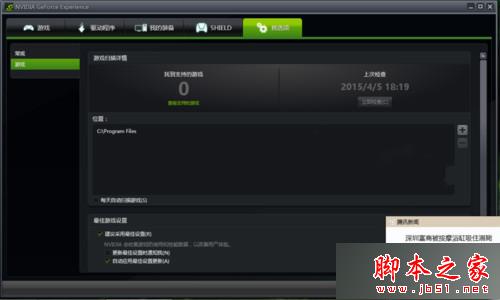
原因:GameStream 串流服務與系統相容性衝突,導致 nvstreamsvc.exe 啟動失敗。關閉或更新驅動均可解決。
Win8/8.1 清理 WinSxS 元件存放區釋放 C 槽空間:DISM 指令 /StartComponentCleanup /ResetBase
Win10 查看體驗指數 (WEI) 兩大法:日誌檔案與命令列重跑分數
Win10 Build 10120 大量截圖曝光:安裝賣萌、半透明開始選單、Edge 新分頁、說明教學
Windows 10 Build 10122/10074 推送安全性更新:修補 IE 瀏覽器與系統漏洞
Win10 開機彈出「登錄組件錯誤 4 請重新啟動電腦管家」解決:刪除 TXSSO 登錄與檔案並重裝 QQ 管家
Win7 提示「由於佈景主題服務未執行,佈景主題無法載入」?啟用 Themes 服務並設為自動啟動即可修復