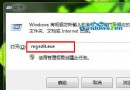
Windows 10 更新或應用程式商店出現 0x800706D9 錯誤,主因是相關系統服務被停用。修復步驟:
services.msc 開啟服務管理員。若以上無效,可能為第三方安全軟體衝突,嘗試暫時解除安裝或重置網路設定 (netsh winsock reset)。
Win10 會員收不到預覽版推送?UAC 設定過高導致,調整為第二級即可修復
Win10 內建防毒 Windows Defender 圖示變身「盾牌」:微軟走向大眾化的策略信號
Win7 hosts 檔案被惡意竄改/損壞?標準內容還原 + 替換徹底修復
Win7 無法上網提示錯誤代碼 118?CMD 指令重設 TCP/IP 與 DNS 快速修復
Windows 10 行動裝置預覽版何時推送?支援執行 EXE 程式嗎?小米 4 將首發
Windows Server 2012 AD RMS 介紹:文件權限管理利器