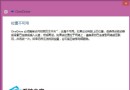
Windows 10 鎖定畫面支援單一圖片、Windows 聚焦(自動輪播)、幻燈片(自選資料夾輪播)三種模式:
設定完成後按 Win + L 鎖定螢幕即可預覽效果。
Win7 手動變更檔案關聯預設開啟程式:預設程式控制台精確指定副檔名對應
WinXP QQ 視訊畫面全黑?啟用/更新 USB 視訊裝置驅動修復
Win7 玩 CF 穿越火線無回應卡死?工作管理員強制結束 crossfire.exe 進程秒解
Superfetch 對老筆電效能影響實測:1GB 記憶體以上建議開啟,以下可關閉
為什麼 Windows 10 捨棄 IE 瀏覽器?全新 EdgeHTML 引擎專注標準,IE 保留僅供企業相容
安裝 5 月補丁後重開機卡在「正在設定 Windows 更新」30%?強制重開機可暫時恢復