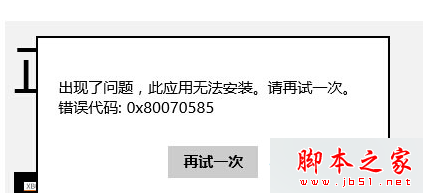
Win8 從應用商店下載安裝應用時彈出錯誤 0x80070585,主因是 Windows Media Player 網路分享服務 (WMPNetworkSvc) 佔用資源導致安裝程序衝突。停用該服務即可修復。
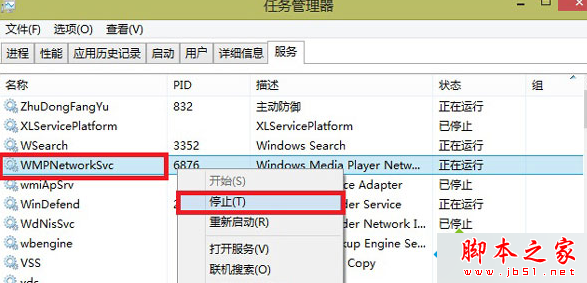
此問題純屬服務衝突,操作簡單,一試即靈。
Win10 啟動後提示「授權即將到期」?KMS 啟動限制與正版授權完整說明
Win10 10130 系統右鍵「內容」消失?群組原則恢復「此電腦」右鍵選單
Win10 Build 10049 登入桌面藍畫面卡住?微軟官方暫時解決方案:Win+L 鎖定重登或 Ctrl+Shift+Esc 開啟工作管理員
Win10 控制台在哪?兩種快速進入方法:此電腦→系統屬性 / 動作中心→所有設定→搜尋
Win7 記憶體錯誤「該記憶體不能為 Read」完整解決指南:註冊 DLL、修補丁、換記憶體槽、清理右鍵選單、註冊表 ShellExecuteHooks
Win7 網路芳鄰只看到 2 台電腦?啟用 NetBIOS over TCP/IP 修復瀏覽清單