Windows XP Windows 7 Windows 2003 Windows Vista Windows 綜合教學 Linux 系統教學
Windows 10 Windows 8 Windows 2008 Windows NT Windows Server 電腦軟體教學
您现在的位置: Windows教程網 >> Windows教程 >  >> Windows 綜合教學 >> 關於 Windows

透過登錄表修改 Windows 系統初始安裝時間:修改 InstallDate UNIX 時間戳記

編輯:關於 Windows

使用驅動人生硬體偵測發現「專一指數」受系統安裝時間影響,欲修改安裝時間提升排名:
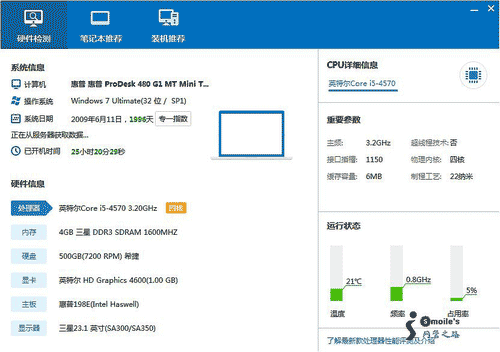
專一指數

Ghost 版 Windows 安裝後時間較早,修改方法:

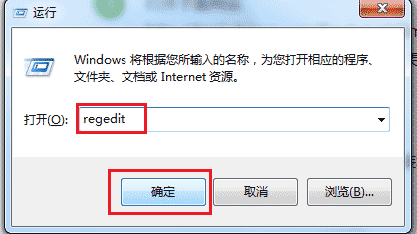
  1. Win+R → regedit 開啟登錄表編輯器。
    開啟regedit
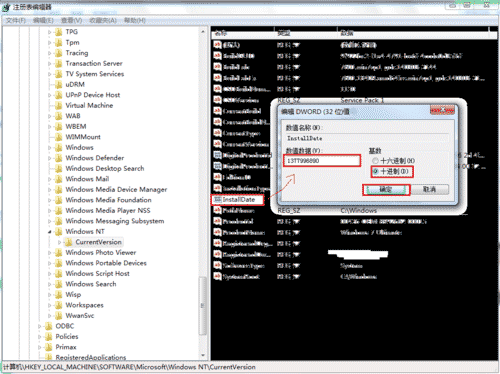
  2. 定位至:HKEY_LOCAL_MACHINE\SOFTWARE\Microsoft\Windows NT\CurrentVersion
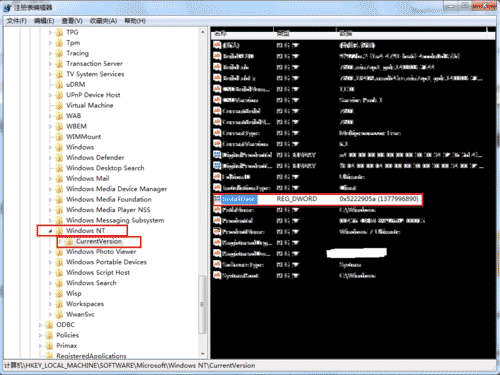
    右側 InstallDate 為微軟儲存初始安裝日期的鍵值(UNIX 時間戳,十進制)。
    InstallDate鍵值
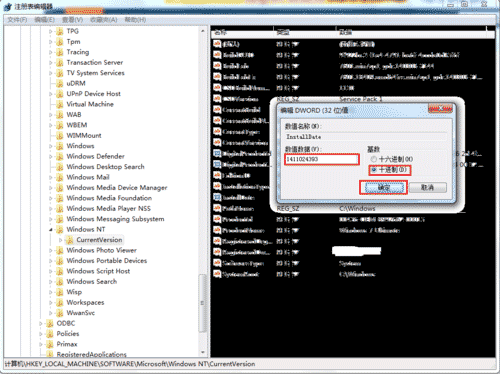
    修改InstallDate
    十進制修改
  3. 開啟 https://tool.chinaz.com/Tools/unixtime.aspx 取得所需 UNIX 時間戳(十進制),填入 InstallDate。
    UNIX時間戳轉換
  4. 關閉登錄表,用 systeminfo 指令查看系統安裝與補丁資訊驗證。
    systeminfo驗證

修改 InstallDate 十進制 UNIX 時間戳即可變更系統初始安裝時間,適用於 Ghost 版系統時間校正。

Copyright © Windows教程網 All Rights Reserved