Win10 內建 Xbox 應用的 Game DVR 功能可能導致遊戲鍵鼠延遲,尤其全螢幕或 3D 遊戲明顯。解決方法:
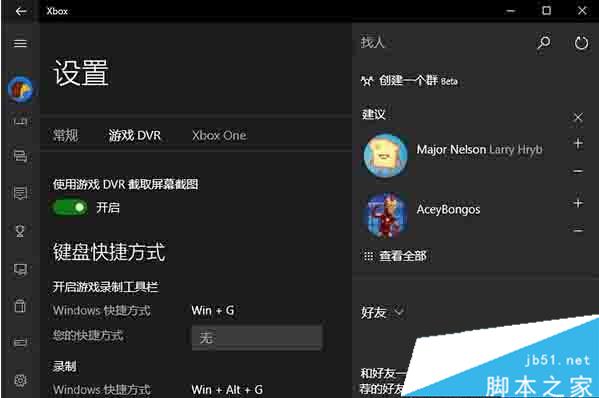
關閉後即可解決遊戲延遲問題。若需使用此功能且確認導致延遲,只能等待 Microsoft 更新修復。
相關推薦:
Win7 筆電滑鼠游標亂動六大原因與解法:滑鼠墊、灰塵、鍵盤異物、病毒、遠端控制、驅動衝突
Windows 7 正確移除 USB 隨身碟操作:延長裝置壽命、防止資料遺失
Win7 禁用 USB 存儲設備 (U盤/移動硬盤) 但保留鼠標鍵盤:組策略/註冊表/專用軟件三法
Win10 開始按鈕右鍵無反應(超級選單不彈出)?註冊表補充 IsShortcut 機碼修復
Win8 360 免費 WiFi 連得上但上不了網?確認寬帶連線共用設定
Windows 8 安裝 MSI 套件出現 2502/2503 錯誤?以系統管理員身分執行 msiexec 解決