Win10 開始按鈕右鍵無法彈出超級選單(Win+X 選單),左鍵正常、工作列右鍵正常。主因是註冊表 HKEY_CLASSES_ROOT\lnkfile 與 piffile 缺少 IsShortcut 字串值。補充即可修復,Win8.1 同適用。
regedit 開啟註冊表編輯器。HKEY_CLASSES_ROOT\lnkfile,右側空白處右鍵→新增→字串值,命名 IsShortcut,數值資料留空。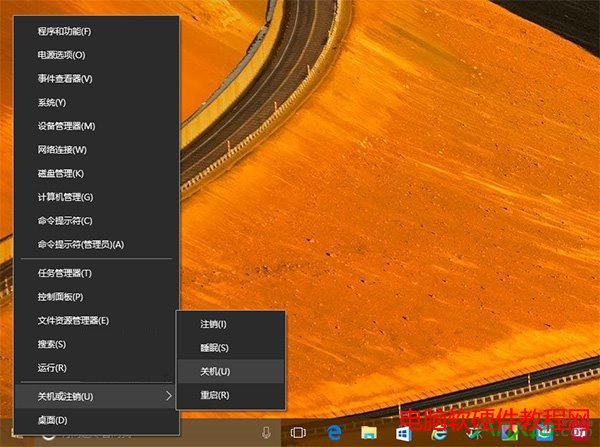
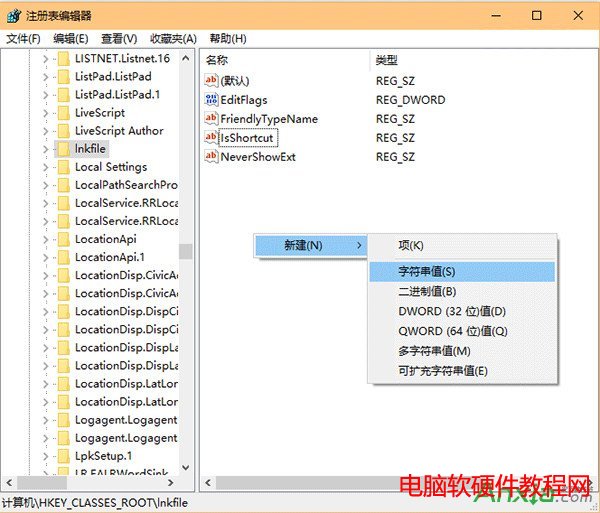
HKEY_CLASSES_ROOT\piffile,同樣新增字串值 IsShortcut,留空。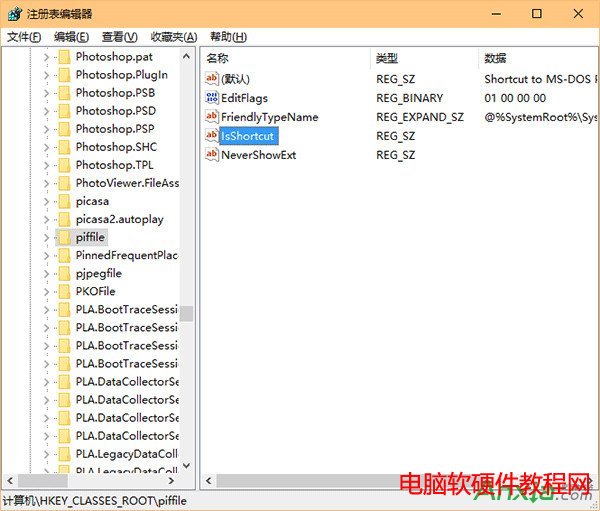
原理: IsShortcut 標記讓 Shell 辨識為捷徑並顯示右鍵選單,某些優化工具誤刪此值導致功能失效。
Win10 Mobile 10080 預覽版:Edge 與 IE11 瀏覽器 HTML5 跑分對比
Windows右键菜单添加“管理员权限”两法:注册表/优化软件一键搞定
Windows 10 禁止強制自動更新:使用官方「Show or hide Updates」工具
Windows XP 開機卡在「Windows 正在啟動」畫面?啟用 Event Log 服務即可解決
電腦 CPU 使用率飆高至 100% 完整排查指南:進程定位、病毒查殺、驅動認證、防毒軟體調整、Svchost 分析
Win10 Outlook 收繁體郵件字體重疊?從 Win7 複製完整字型資料夾修復