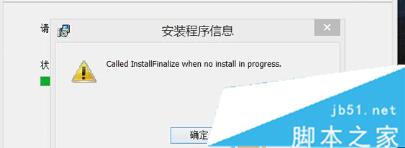
Windows 8.1 使用者在安裝或解除安裝軟體時,偶爾會遇到錯誤訊息:「called runscript when not marked in progress」,導致安裝程式中止。這是 Windows Installer 服務與檔案總管 交互異常導致的已知問題。本文提供經驗證有效的三步驟修復法,無需重裝系統。
執行 .msi 或 .exe 安裝程式時,進度條走到一半突然彈出錯誤視窗,內容為 called runscript when not marked in progress,點擊確定後安裝回滾失敗。
Windows Installer 服務 在處理安裝腳本時,需要與檔案總管 進程協作存取檔案系統。若當前的 explorer.exe 進程處於異常狀態 (如掛起、權限不足、模組衝突),Installer 服務無法正確標記腳本執行狀態,拋出此錯誤。
C:\Windows\explorer.exe。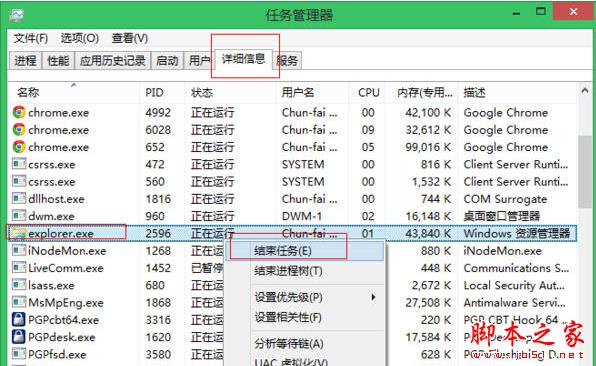
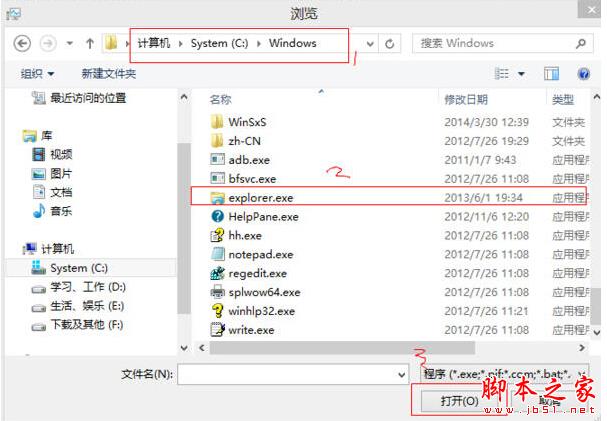
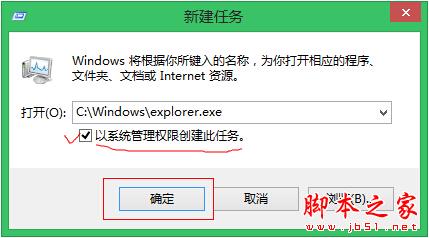
以管理員身分重新啟動 explorer.exe,可重置其權限 Token 與 COM 物件狀態,確保後續 Windows Installer 服務呼叫檔案總管介面時能正確建立腳本執行標記。此法同樣適用於「安裝程式無回應」、「解除安裝卡住」等 Installer 相關問題。
msiexec /unregister → msiexec /regserver → 重開機。services.msc → 確認「Windows Installer」啟動類型為「手動」,狀態為「執行中」。sfc /scannow → DISM /Online /Cleanup-Image /RestoreHealth。「called runscript when not marked in progress」雖然看似晦澀,但本質上只是檔案總管進程狀態異常。以管理員身分重啟 explorer.exe 即能在 1 分鐘內解決 95% 以上案例,免去重灌系統之苦。