Windows XP Windows 7 Windows 2003 Windows Vista Windows 綜合教學 Linux 系統教學
Windows 10 Windows 8 Windows 2008 Windows NT Windows Server 電腦軟體教學
您现在的位置: Windows教程網 >> Windows教程 >  >> Windows 綜合教學 >> 關於 Windows

Win10 開啟 ANSYS 停止運作?以系統管理員身分重啟 License Manager 解決授權衝突

編輯:關於 Windows

升級 Win10 後 ANSYS 啟動即停止運作,主因為授權管理器衝突。解決方法:

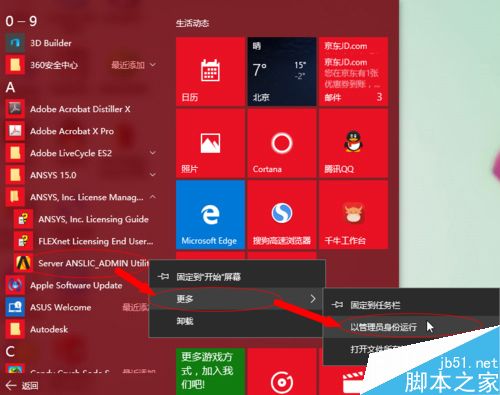
  1. 「開始」選單找到 ANSYS → 右鍵「ANSYS License Manager」→ 「以系統管理員身分執行」。
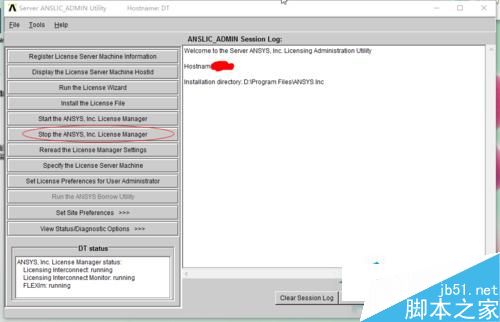
  2. 開啟 License Manager 介面,先點「Stop License」關閉授權服務。
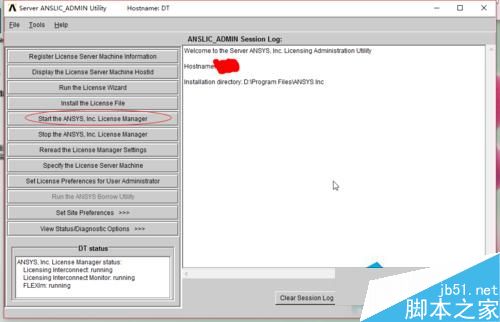
  3. 稍待片刻,再點「Start License」重新啟動授權服務。
  4. 此時 ANSYS 應可正常啟動使用。

此為授權服務重置操作,適用於升級系統後導致 FlexNet License Manager 狀態異常的情況。

Copyright © Windows教程網 All Rights Reserved