Windows XP Windows 7 Windows 2003 Windows Vista Windows 綜合教學 Linux 系統教學
Windows 10 Windows 8 Windows 2008 Windows NT Windows Server 電腦軟體教學
您现在的位置: Windows教程網 >> Windows教程 >  >> Windows 綜合教學 >> 關於 Windows

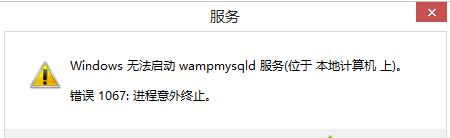
Win7 MySQL 服務啟動失敗報錯 1067?四大修復方案總整理

編輯:關於 Windows

Windows 7 下 MySQL 服務無法啟動、報錯 1067,常見於儲存引擎設定衝突、InnoDB 日誌檔損壞、設定檔遺失等情況。提供四種由簡入繁的修復方案。
方案一:切換預設儲存引擎並清理 InnoDB 日誌 (最常用)

  1. 編輯 my.ini,將 default-storage-engine=InnoDB 改為 default-storage-engine=MyISAM。
  2. 刪除 MySQL 安裝目錄 Data 資料夾下的 ib_logfile0、ib_logfile1。
  3. 根據 my.ini 中 innodb_data_home_dir 設定的路徑,刪除 ibdata1。
  4. 重新啟動 MySQL 服務。

方案二:刪除 Windows 目錄下的 my.ini 並重裝

刪除 C:\Windows\my.ini (若存在) → 重新安裝 MySQL,安裝精靈會重新產生乾淨設定檔。

方案三:使用 winmysqladmin 產生設定檔並複製到系統目錄

  1. 執行 winmysqladmin.exe 產生 my.ini。
  2. 執行 mysqld -install 安裝服務。
  3. 執行 net start mysql 啟動服務。
  4. 若仍失敗,將產生的 my.ini 複製到 C:\Windows\ 下再啟動。

方案四:WAMP 環境下覆蓋安裝修復

  1. 關閉 WAMP 所有服務。
  2. 執行 WAMP 安裝程式選擇「覆蓋安裝」/「修復」。
  3. 重新啟動 MySQL 服務。

視環境狀況選擇任一方案,通常方案一即可解決 90% 的 1067 錯誤。
Copyright © Windows教程網 All Rights Reserved