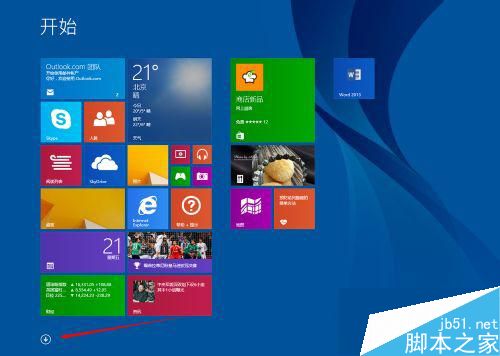
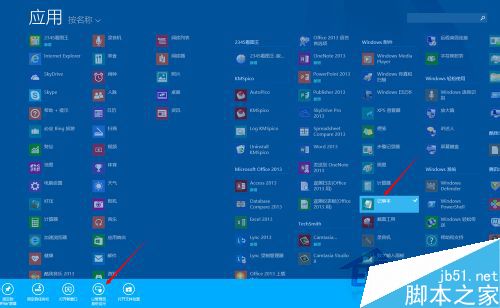
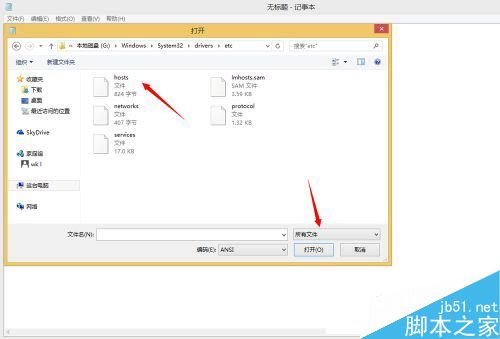
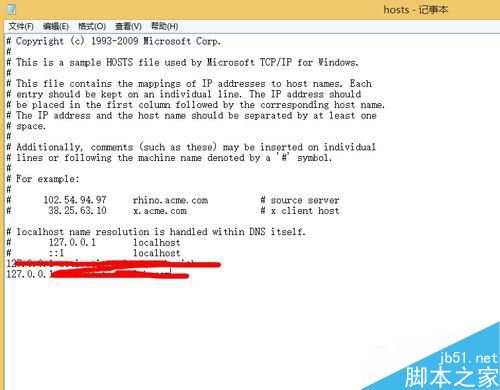
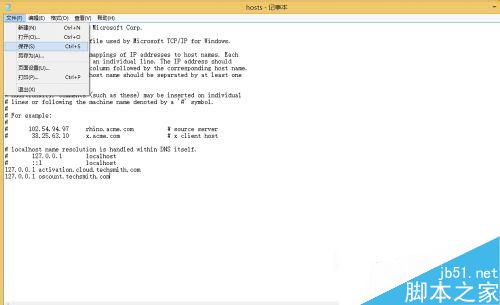
將常用網站的 IP 與域名對應寫入 C:\Windows\System32\drivers\etc\hosts,瀏覽器解析時直接跳過 DNS 查詢,可顯著提升存取速度。Win8.1 需以管理員身分開啟記事本才能存檔。
C:\Windows\System32\drivers\etc\hosts
IP 域名
192.168.1.100 myserver.local
修改即時生效,無需重開機。
Windows 10 Redstone Build 11082 已知問題完整彙總:語言包失效、檔案進度條消失、預設應用被重置
Windows Azure Pack 部署規範:電腦命名、防火牆連接埠對照表
無需光碟超簡單重裝 WinXP:一鍵還原 GHO 映像檔完整實錄
Win10 更換桌面主題與背景個性化:內建主題、線上下載、自訂幻燈片
Win10 Xbox App 登入錯誤 0x800488AB 解決:切換帳戶登入法
Windows XP 修改 NetBIOS 名稱完整教學與電腦名稱差異解析
Win10 如何查看補丁是否更新到最新?設定頁面與版本號雙重驗證
Windows 10 如何還原系統?一鍵還原完整圖文教學