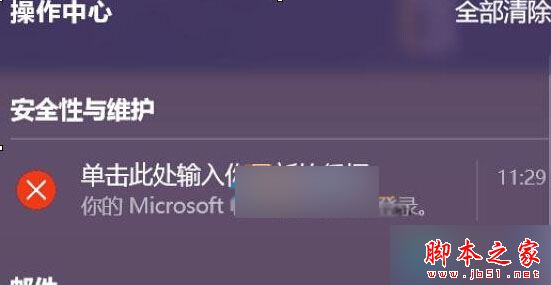
Win10 64 位元旗艦版開機/重啟彈出「單擊此處輸入您最新的憑證」,為 Microsoft 帳戶同步狀態異常。解除綁定再重新綁定即可修復。
Microsoft 帳戶雲端憑證 (Token) 與本地快取不同步,常發生於密碼變更、雙因子驗證變更、跨裝置登入後。重新綁定強制同步最新憑證。
若關機提示「記憶體不能為 read」,請參考:Win10 關機記憶體錯誤排查
操作簡單、無風險、即時生效。
Windows XP 系統死機自動重啟設定教程 註冊表修改輕鬆搞定
Win8 封鎖特定帳戶本地登入:本地安全性原則設定
Win10 如何設定預設輸入法?控制台「進階設定」覆寫預設輸入法
Win10 Mobile 10586.164 中文版升級截圖曝光:版本號大幅跳躍預示穩定性躍升
Windows 指令模式設定靜態 IP 與 DNS 完整教學:netsh 指令詳解
酷炫技術:在 Windows 上安裝 OpenSSH 服務,透過 SSH 遠端管理
Windows 7 滑鼠懸停自動啟用視窗:輕鬆存取設定啟用
Windows 10 週年更新 14393.82 累積更新 KB3176934/KB3176936 修正內容彙整