Win10 架設 IIS 開發 ASP 應用程式需啟用詳細錯誤訊息顯示於瀏覽器,需在 IIS 管理員中完成兩處設定。
設定步驟
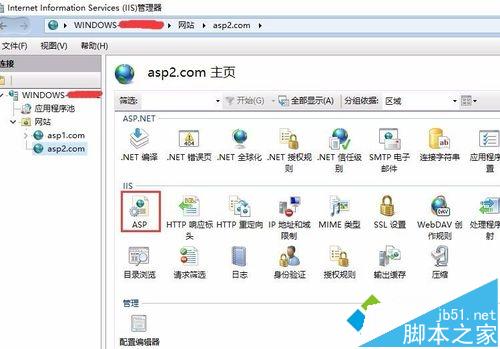
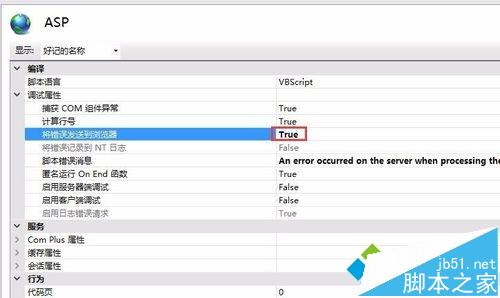
- 開啟 IIS 管理員 → 點擊網站 → 雙擊「ASP」
- 「偵錯屬性」→「將錯誤傳送到瀏覽器」→ True → 套用
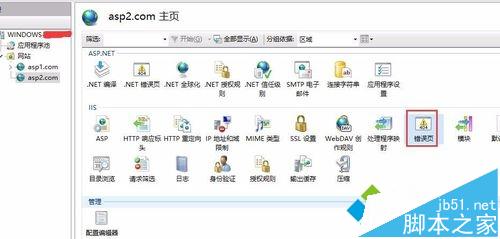
- 回到網站首頁 → 雙擊「錯誤頁面」
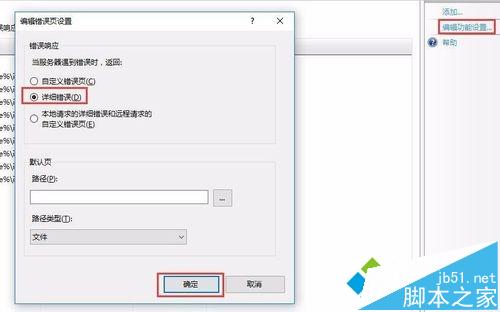
- 右側「編輯功能設定」→ 選擇「詳細錯誤」→ 確定
驗證
瀏覽器造訪 ASP 頁面製造錯誤 (如語法錯誤、資料庫連線失敗),應顯示完整錯誤碼、行號、描述,而非預設的一般性 HTTP 500 頁面。
⚠ 生產環境注意
- 除錯完成後務必改回「自訂錯誤頁面」或「詳細僅限本機」
- 避免洩露資料庫連線字串、伺服器路徑、程式碼結構等敏感資訊
開發階段啟用詳細錯誤大幅提升除錯效率,上線前記得關閉。