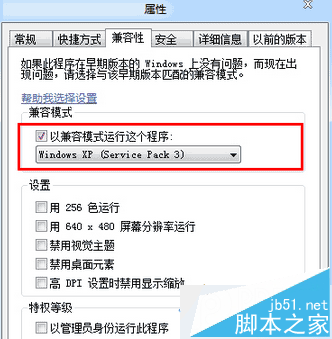
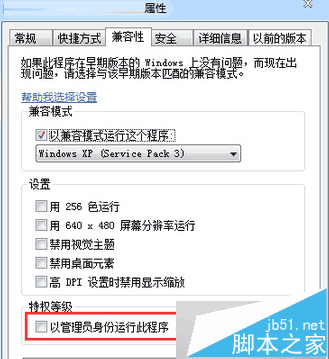
Win7 執行經典《紅色警戒》易黑畫面,設定相容模式即可解決。
勾選管理員身分執行是關鍵。更多老遊戲相容性設定請關注本站!
Win7 插入 USB 隨身碟顯示 I/O 裝置錯誤?重新指派磁碟代號修復
Windows 7 滑鼠懸停桌面圖示不顯示提示資訊?開啟「資料夾選項」勾選即可解決
Windows 10/8.1/7無法辨識USB裝置三大解決方案
Windows 7 硬碟指示燈狂閃不停?四大優化步驟降低讀寫、延長壽命
Win10 Mobile 10136 快速上手影片:UI 提升、Cortana 改進、流暢度增強,但仍有問題建議備用機體驗
Win10 找不到 Guest 帳號?啟用與允許登入完整教學
Win10 設定預設顯示圖示而非縮圖,舊電腦開啟圖片資料夾不再卡頓
Windows 8 更換 Metro 開始畫面背景顏色與紋理:電腦設定 → 個人化 → 開始畫面