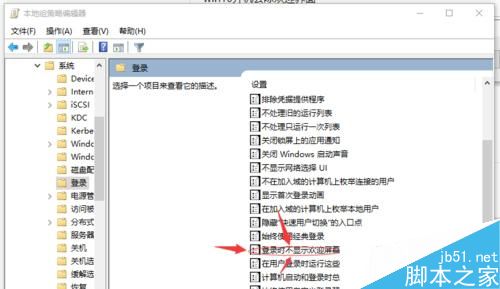
Win10 開機必經歡迎畫面才進桌面,透過本機群組原則即可設定跳過。操作簡單,適合不需密碼登入的環境。
gpedit.msc
若電腦設有登入密碼,即使啟用此設定,歡迎畫面(密碼輸入介面)仍會顯示。 僅適用於無密碼帳戶環境。
Win10 如何刪除內建應用?PowerShell 命令批次卸載預裝應用教學
安裝 Win10 9879 卡在 18% 進度?斷網大法秒解
Win10 使用者建議恢復顯示更新補丁大小,微軟:若呼聲高將考慮重新加入
Win10 內建 DISM 工具修復系統映像,掃描、檢查、修復全流程
Win7 攝影機找不到圖示?建立捷徑固定到「電腦」/桌面快速存取教學
Win10 9901 升级教程:软媒魔方一键 U 盘启动/硬盘装机、ISO 原地升级、VHD 隔离安装多法可选
Win10執行Dxdiag提示「DirectX診斷工具已停止工作」?DISM修復系統檔案完整教學
Windows 10查看MAC地址兩大法:圖形介面與命令列完整教學