Win7 右下角小喇叭不見,聲音正常但無法從工作列調節,控制台勾選「將音量圖示放入工作列」卻提示「由於未安裝音量控制程式,Windows 無法在工作列顯示音量控制」。主因是 sndvol32.exe 遺失 或相關服務停用。請依序嘗試以下五招。
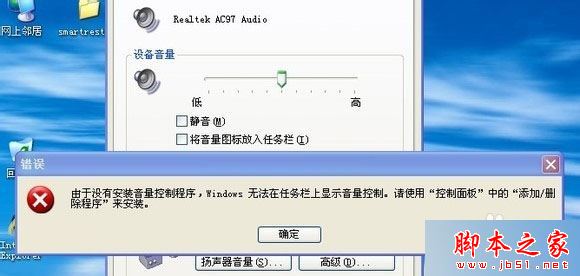
方法一:補回 sndvol32.exe(最直接)
檔案路徑:`C:\Windows\System32\sndvol32.exe`。從其他正常 Win7 電腦複製,或從系統安裝光碟 `sndvol32.ex_` 解壓縮(用 `expand` 指令)後重命名為 `sndvol32.exe` 放入 System32。
方法二:下載「修復小喇叭工具」
網路搜尋下載免安裝的「修復小喇叭工具」,雙擊執行依提示操作即可自動修復。
方法三:啟用 SSDP Discovery 與 UPnP 服務
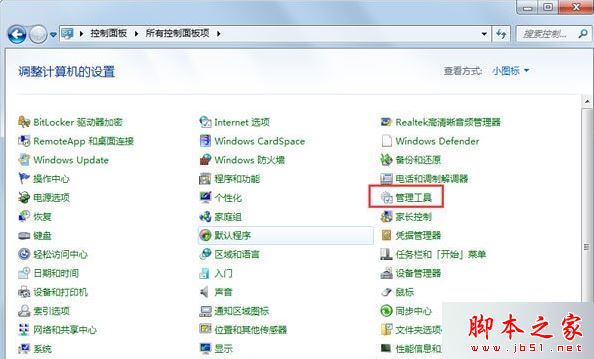
- 控制台 → 管理工具 → 服務。
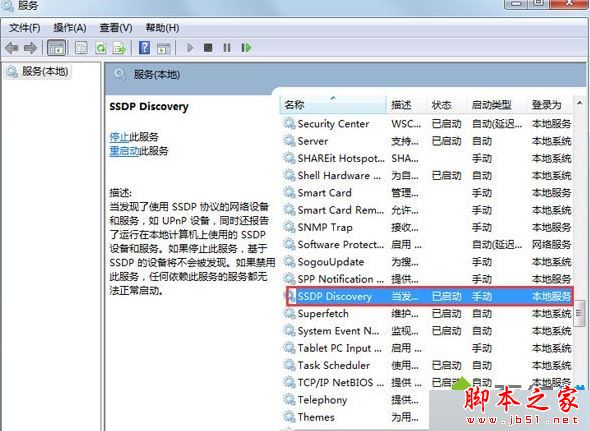
- 找到 SSDP Discovery Service 與 Universal Plug and Play Device Host。
- 右鍵 → 內容 → 啟動類型改為「自動」 → 啟動 → 確定 → 重開機。
方法四:登錄檔恢復啟動項
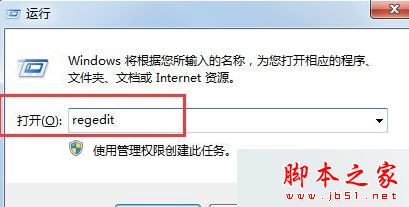
- `Win+R` 輸入 `regedit` 開啟登錄編輯器。
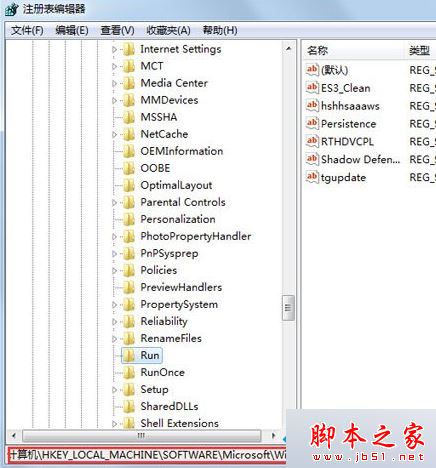
- 瀏覽至 `HKEY_LOCAL_MACHINE\SOFTWARE\Microsoft\Windows\CurrentVersion\Run`。
- 右鍵空白處 → 新增 → 字串值,名稱 Systray,數值資料 c:\windows\system32\Systray.exe。
- 重開機生效。
方法五:系統檔案修復
管理員命令提示字元執行 `sfc /scannow` 修復遺失/損毀系統檔。
相關閱讀: 升級 Win7 後沒聲音但驅動正常解決法
依序嘗試通常能找回音量圖示。建議先從方法一、三著手。