Win10 關閉 IE11 後想重新啟用,在「開啟或關閉 Windows 功能」勾選 IE11 卻無法安裝。解決核心:先徹底移除殘留註冊,再重新啟用。
FORFILES /P %WINDIR%\servicing\packages /M Microsoft-Windows-InternetExplorer-*11.*.mum /c "cmd /c echo Uninstalling package @fname && start /w pkgmgr /up:@fname /norestart"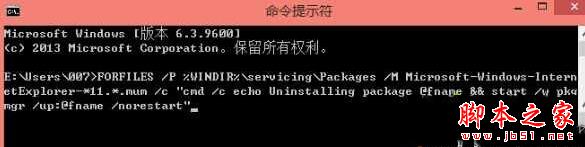
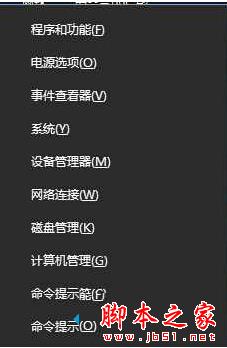
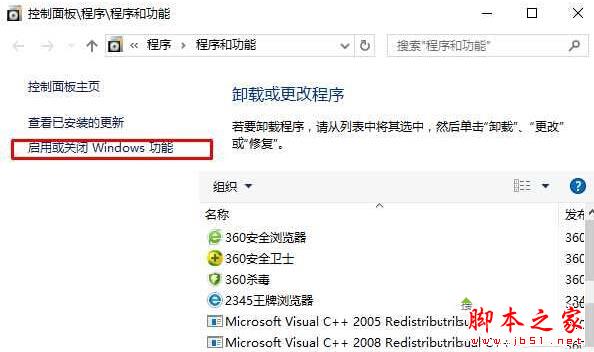
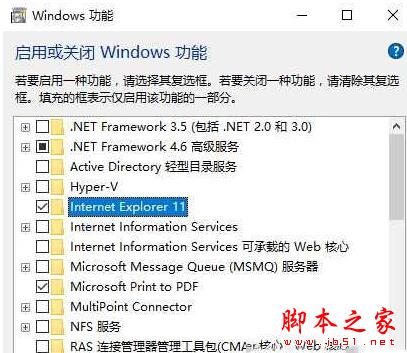
先清理殘留註冊資訊,再啟用功能,避免「已安裝但實際損壞」的狀態衝突。延伸閱讀:Win10 IE11 提示未安裝 Flash Player 解決教程。
Win10 14328 簡體中文專業版 64 位 ISO 下載(官方 ESD 轉製、含軟媒魔方/旗魚瀏覽器)
Win10 Build 986x 變革:Charms 欄網路功能改為獨立視窗,提供更多 Wi-Fi 選項、熱點列表與 VPN 控制
Win7 安裝 ActiveX 控制項完整教學:解決瀏覽器阻擋不安全控制項問題
Win10 RS1 分支 Windows Server 2016 TP4 14267 介面截圖曝光:比桌面版更穩定效能更強
Windows 7 停用 IE 伺服器設定教學:取消代理伺服器恢復直連上網
【影片】香港美女實測 Win10 正式版 Windows Hello 生物識別功能