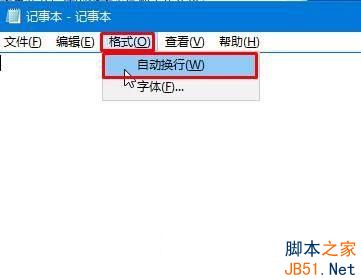
Win10 記事本輸入文字不自動換行,需手動按 Enter,排版凌亂。其實記事本內建自動換行功能,只需開啟即可。
設定後,文字輸入滿一行即自動換行,排版整齊無需手動換行。簡單實用的小技巧,提升記事本使用體驗。
Windows 8 建立虛擬網卡並啟動託管網路 (Hosted Network) 共享上網
Win7/Win8.1 徹底阻止 Win10 升級文件下載:卸載補丁+隱藏更新雙保險
Win7 任務列鎖定程式失效與快捷方式小箭頭移除完整解決方案
Win8 任務列圖示大小調整:使用小任務列按鈕節省空間
Windows 10 PowerShell 重設應用程式失效?改用 DISM 指令修復系統映像徹底解決
Win7 360 瀏覽器打不開網頁?重裝瀏覽器、關閉防火牆預設、檢查殺毒軟體攔截
Win10 每天固定時間自動開機?關閉「自動維護喚醒」即可解決
Win7 玩《英雄聯盟》跳出 PVP.net 斷線自動關閉?停用 IP Helper 服務即可解決