Windows XP Windows 7 Windows 2003 Windows Vista Windows 綜合教學 Linux 系統教學
Windows 10 Windows 8 Windows 2008 Windows NT Windows Server 電腦軟體教學
您现在的位置: Windows教程網 >> Windows教程 >  >> Windows 綜合教學 >> 關於 Windows

Win7 開機黑畫面提示 ntoskrnl.exe 遺失或損壞?從正常系統複製檔案覆蓋修復

編輯:關於 Windows

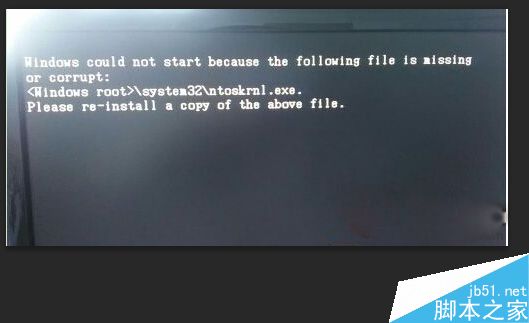
Windows 7 開機黑畫面顯示:
Windows could not start because the following file is missing or corrupt: \system32\ntoskrnl.exe. Please reinstall a copy of the above file.

ntoskrnl.exe 是 Windows 核心映像檔,負責系統啟動核心初始化。遺失/損壞會導致無法進入作業系統,常因軟體安裝衝突、病毒感染、硬碟壞軌造成。

修復步驟

  1. 從相同版本的正常 Win7 系統,複製 C:\Windows\System32\ntoskrnl.exe(或從可信來源下載)。
  2. 使用 WinPE (USB 開機碟) 或 DOS 環境啟動電腦。
  3. 將檔案複製貼上到故障系統的 C:\Windows\System32\ 目錄覆蓋。
  4. 重新開機,進入系統後立即執行完整掃毒。

ntoskrnl.exe錯誤畫面

注意事項

  • 檔案版本必須與系統版本完全一致(含 Service Pack、更新版本),否則可能導致更嚴重藍畫面。
  • WinPE 環境操作最接近 Windows 檔案系統,推薦使用。
  • 修復後務必查毒,排除病毒持續感染風險。

此類核心檔案遺失屬嚴重系統故障,若無同版本系統可取檔,建議直接重裝系統更保險、省時。

Copyright © Windows教程網 All Rights Reserved