Windows XP Windows 7 Windows 2003 Windows Vista Windows 綜合教學 Linux 系統教學
Windows 10 Windows 8 Windows 2008 Windows NT Windows Server 電腦軟體教學
您现在的位置: Windows教程網 >> Windows教程 >  >> Windows 綜合教學 >> 關於 Windows

Win10 執行程式提示缺少 mscomctl.ocx?下載註冊 DLL 完整解決教學(含 32/64 位元路徑)

編輯:關於 Windows

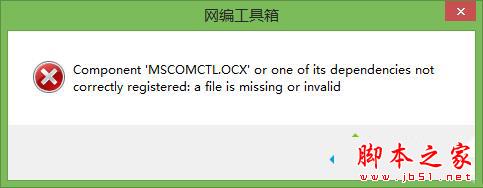
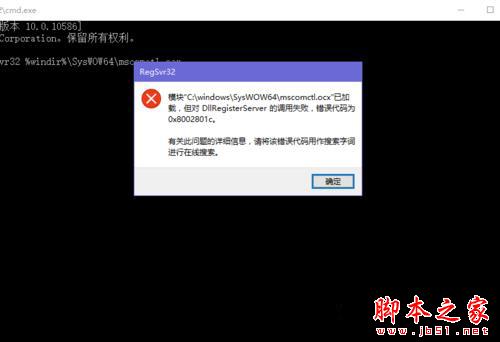
在 Win10 執行舊版開發工具(如 VB6 編寫程式)時,常跳出「Component 'mscomctl.ocx' or one of its dependencies not correctly registered」錯誤。這是因為系統缺少這個通用控制元件,需手動下載、放置正確路徑並註冊。

解決步驟

  1. 下載 MSCOMCTL.OCX 檔案(網路搜尋即可找到,約 425 KB)。
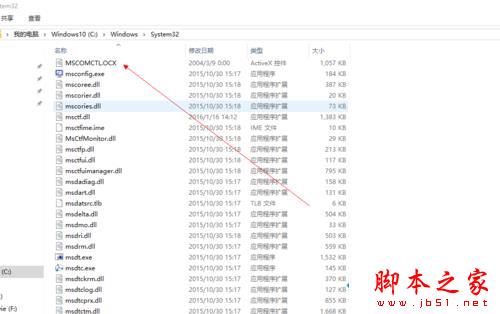
  2. 解壓縮後,依系統位元數複製到對應資料夾:
    32 位元系統: C:\Windows\System32
    64 位元系統: C:\Windows\SysWOW64
    (注意:64 位元系統的 32 位元程式庫放在 SysWOW64,非 System32)
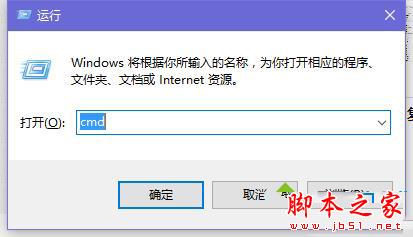
  3. 以「系統管理員身分」開啟「命令提示字元」(Win+X → 命令提示字元 (系統管理員))。
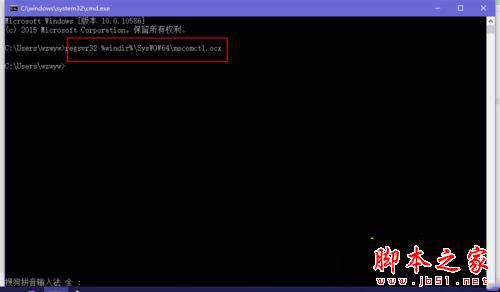
  4. 輸入對應指令註冊:
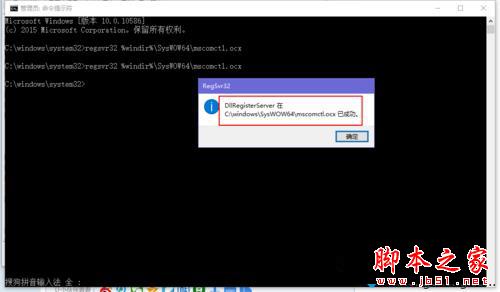
    32 位元: regsvr32 %windir%\System32\mscomctl.ocx
    64 位元: regsvr32 %windir%\SysWOW64\mscomctl.ocx

  5. 若出現錯誤訊息,請確認是否以管理員身分執行 CMD,重新執行指令即可。
  6. 註冊成功會跳出「DllRegisterServer in ... succeeded」視窗,程式即可正常執行。

錯誤訊息畫面

下載檔案資訊

解壓縮檔案

複製路徑示意

CMD 管理員模式

註冊指令

錯誤處理

程式正常執行

延伸閱讀

註冊完成後,舊版應用程式即可在 Win10 下完美執行。建議從可信來源下載 OCX 檔案,避免惡意程式碼。

Copyright © Windows教程網 All Rights Reserved