覺得鍵盤反應遲鈍?可透過註冊表修改 KeyboardSpeed 數值提高重複率(字元重複輸入速度)。
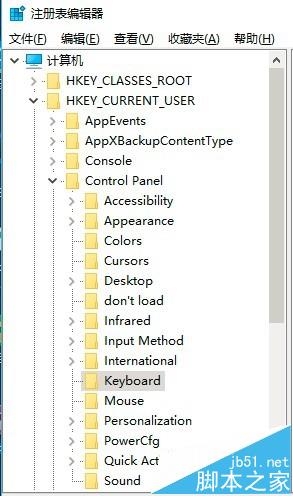
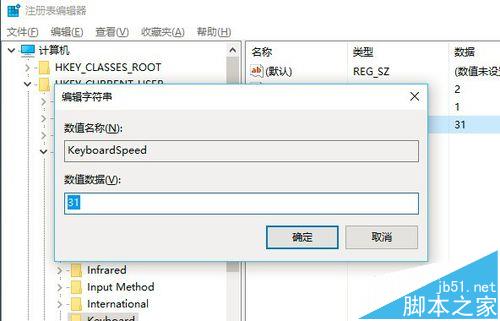
regedit。HKEY_CURRENT_USER\Control Panel\Keyboard31 改為 46 或更大(最大 46)。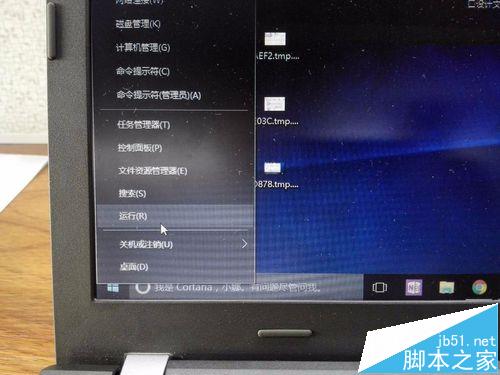
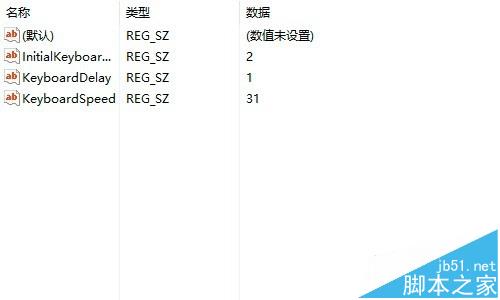
補充:同路徑下的 KeyboardDelay(延遲時間,預設 1,可改 0)亦可一併調整,體驗更跟手。
Win10 Build 10120 曝光:Edge 成為預設 PDF 閱讀器,Music/Video 脫離預覽版
百度 Win10 直通車下載的安裝檔在哪?預設儲存於非系統盤、容量最大且大於 5GB 的磁碟分區
Win7 進入 PE 系統徹底清除頑固病毒:口袋 PE + 格式化非系統碟 + 重裝系統
Windows 7 AppLocker 禁止特定程式執行:防止小孩沉迷遊戲、保護隱私軟體
Win8 CMD 提示「主控台視窗主進程已停止運作」?切換至英數輸入法即可解決
Win10 AMD 顯卡「應用程式設定模式」開啟遊戲停止運作 解決方法