Win7 IE 點開隨即關閉,常因 actxprxy.dll (ActiveX Proxy) 註冊失效。用 regsvr32 重新註冊或重裝 IE 即可修復。
方法一:重新註冊 actxprxy.dll (最快)
- Win + R →
regsvr32 actxprxy.dll → 確定。
- 彈出「DllRegisterServer in actxprxy.dll succeeded」表示成功。
- 重新開啟 IE 驗證。

方法二:重裝 Internet Explorer (徹底)
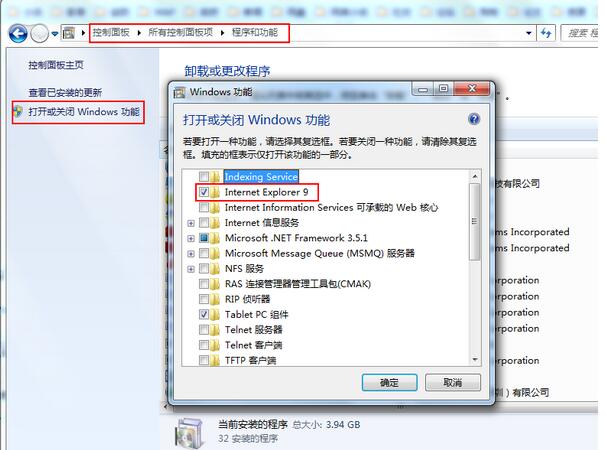
- 控制台 → 程式和功能 → 開啟或關閉 Windows 功能。
- 取消勾選 Internet Explorer 11 → 確定 → 重開機。
- 再次進入 Windows 功能 → 勾選 IE 11 → 確定 → 重開機。
適用情境
- 方法一適用於單一 DLL 註冊遺失/損毀 (最常見)。
- 方法二適用於 IE 核心檔案大量損毀、第三方工具列深度破壞。
- 若兩法皆無效,建議
sfc /scannow 修復系統檔案或建立新使用者帳號測試。