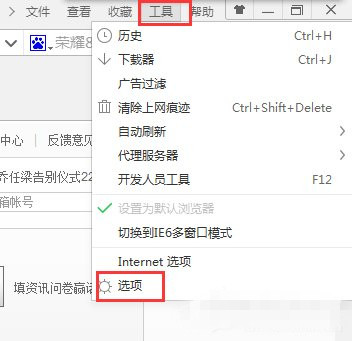
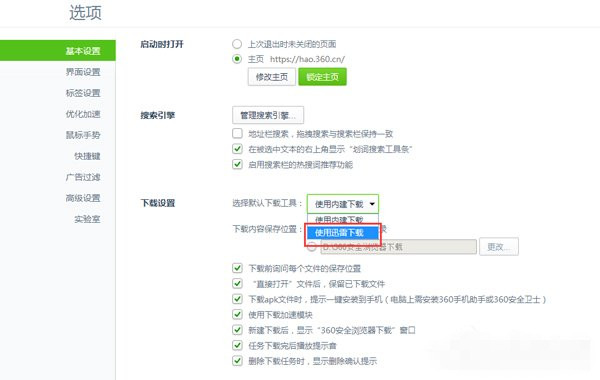
360 瀏覽器內建下載器速度較慢,許多用戶習慣用迅雷下載。本文教你在 360 瀏覽器設定中將預設下載工具改為迅雷,下載連結自動交給迅雷處理。
Win10 本機帳號如何切換為 Microsoft 帳號?啟用商店/同步/雲端功能
下載:Windows 10 Build 10122 中文 64 位 ISO(網友封裝)
Win8 停用運行中服務釋放記憶體:Ctrl+Shift+Esc 開啟工作管理器→服務分頁→右鍵運行中服務→停止
Win10 週年更新正式版 14393.222 全面推送:KB3194496 更新內容完整彙總
Win8 開始選單字型變方框亂碼?缺少預設 UI 字型補回即可修復
Win7 手機連接 USB 提示「正在安裝驅動程式」無反應?資料夾選項隱藏空磁碟機解決
Windows 7 手動優化:關閉虛擬記憶體、休眠模式、系統還原釋放資源
Win8.1 安裝 Office 365 錯誤 30125-1011 (404)?手動指定 DNS 4.2.2.2/4.2.2.1 或換時間點重試