Windows 10 PC 預覽版 14942 部分用戶回報 Microsoft Edge 啟動即崩潰。外媒提供註冊表修復方案,需謹慎操作(修改註冊表有風險)。
regedit 開啟註冊表編輯器。HKEY_CURRENT_USER\Software\Classes\Local Settings\Software\Microsoft\Windows\CurrentVersion\AppContainer\Storage\microsoft.microsoftedge_8wekyb3d8bbwe\Children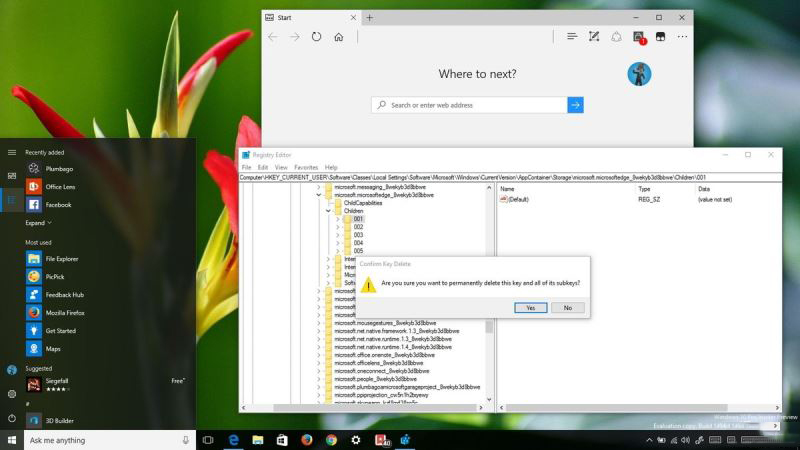
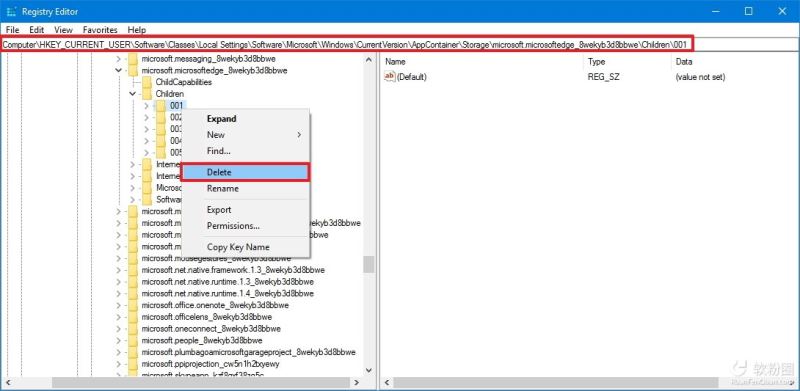
重要提醒: 僅刪除子項,保留 Children 主鍵。操作前建議匯出該分支備份。
Windows 10 隱藏神器 Game Bar 螢幕錄影教學:Win+G 開啟、Win+Alt+R 錄製、Xbox 應用管理剪輯
Win10 正式版開始選單與 Cortana 嚴重錯誤:暫時解法為進入安全模式後重啟
Windows XP 無法安裝新字體(如細明體/標楷體)?修復 Fonts 資料夾屬性與 desktop.ini 完整解法
Win10 執行 VC6.0 相容性設定教學:重命名執行檔 + 相容模式 + 圖示修復
Win10 筆電如何關閉集顯強制用獨顯?裝置管理員一鍵停用核心顯卡教學