Windows XP Windows 7 Windows 2003 Windows Vista Windows 綜合教學 Linux 系統教學
Windows 10 Windows 8 Windows 2008 Windows NT Windows Server 電腦軟體教學
您现在的位置: Windows教程網 >> Windows教程 >  >> Windows 綜合教學 >> 關於 Windows

Win8 電腦無法辨識 iPad?iTunes 版本與驅動不匹配,重裝最新版解決

編輯:關於 Windows

升級/降級 iTunes 後導致 iPhone/iPad 無法辨識,實為 Apple Mobile Device Support 驅動版本與 iTunes 不匹配。

解決步驟

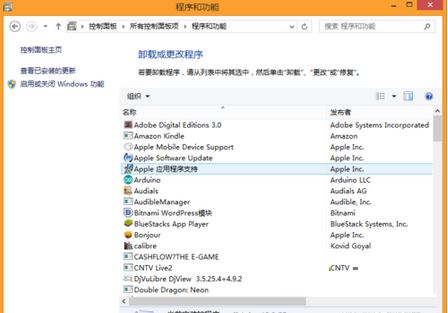
  1. 控制台 →「程式與功能」。
  2. 移除 Apple Mobile Device Support 與 iTunes(前者常被忽略,實為 iOS 核心驅動)。
  3. 下載安裝最新版 iTunes,安裝過程會自動提示安裝 Apple Mobile Device Support,確認即可。

核心在於完整移除舊驅動再隨 iTunes 重裝匹配版本,而非單獨更新 iTunes。

Copyright © Windows教程網 All Rights Reserved